Showing posts with label Forensic Imaging & DATA Extraction. Show all posts

Friday, April 7, 2023

Digital Forensic Data Acquisition Course

Digital Forensic Data Acquisition Course 

       วันนี้แอดจะมาแนะนำ Course  หลักสูตรเก็บรวบรวมพยานหลักฐานดิจิทัลภาคปฎิบัติ  สำหรับช่างเทคนิคทางนิติวิทยาศาสตร์ดิจิทัลที่ต้องการเรียนรู้ วิธีการได้มาซึ่งข้อมูลทางนิติวิทยาศาสตร์ดิจิทัล และหลักการจัดการและการเก็บรักษาหลักฐานดิจิทัล และสามารถนำไปทำงานได้จริง

เป็นการรวบรวมและกู้คืนข้อมูล ในระหว่างการสืบสวนทางนิติวิทยาศาสตร์ดิจิทัลเรียกว่าการได้มาซึ่งข้อมูล อาชญากรรมทางไซเบอร์มักเกี่ยวข้องกับการแฮ็กหรือความเสียหายของข้อมูล นักวิเคราะห์ทางนิติวิทยาศาสตร์ดิจิทัลจำเป็นต้องรู้วิธีเข้าถึง และกู้คืนข้อมูลนั้น ตลอดจนวิธีปกป้องข้อมูลเพื่อการจัดการในอนาคต สิ่งนี้เกี่ยวข้องกับ(forensics Image)การสร้างภาพทางนิติวิทยาศาสตร์จากอุปกรณ์ดิจิทัลและเทคโนโลยีคอมพิวเตอร์อื่นๆ

ผู้ตรวจสอบคอมพิวเตอร์จะต้องได้รับการฝึกอบรมเกี่ยวกับวิธีการได้มาซึ่งข้อมูล (Data Acquisition) เนื่องจากสถานการณ์ที่แตกต่างกันอาจต้องใช้เทคนิคที่แตกต่างกัน ผู้ตรวจสอบทางนิติวิทยาศาสตร์ดิจิทัลจำเป็นต้องทราบวิธีการได้มาซึ่งข้อมูลประเภทต่างๆ และควรรู้ว่าเมื่อใดควรเลือกใช้วิธีใดวิธีหนึ่ง เหนือสิ่งอื่นใด พวกเขาต้องแน่ใจว่าวิธีการที่เลือกไม่ทำให้หลักฐานที่เป็นปัญหาเสียหาย ท่านสามารถเรียนรู้ได้จากหลักสูตรนี้

Digital Forensic Data Acquisition Course

การพิสูจน์หลักฐานดิจิทัลจะใช้ในการกู้คืนและตรวจสอบหลักฐานดิจิทัลที่จะใช้ในศาลสำหรับคดีอาชญากรรม รวมถึงการฉ้อโกง การจารกรรม การสะกดรอยตามทางไซเบอร์ การโจรกรรมข้อมูล หรืออาชญากรรมรุนแรง หลักฐานทางนิติวิทยาศาสตร์ดิจิทัลถือเป็นมาตรฐานเดียวกับหลักฐานทางกายภาพ ซึ่งหมายความว่าจะต้องเป็นของจริง ยอมรับได้ และได้มาอย่างน่าเชื่อถือ สิ่งสำคัญคือผู้เชี่ยวชาญด้านการพิสูจน์หลักฐานดิจิทัลต้องเข้าใจความท้าทายด้านเทคนิค กฎหมาย และการบริหารที่ต้องเผชิญกับการพิสูจน์หลักฐานของข้อมูล เพื่อปกป้องข้อมูลที่รวบรวมได้ก่อนที่จะถูกส่งไปวิเคราะห์เพื่อให้แน่ใจว่าหลักฐานจะอยู่ในชั้นศาล


หลักสูตรนี้เหมาะกับใคร

ผู้เชี่ยวชาญทางไซเบอร์ ,เจ้าหน้าที่จัดเก็บหลักฐานทางดิจิทัล ,ช่างเทคนิคไอที ที่มีความรุ้เบื่้องต้นเกี่ยวกับแนวคิดทางนิติวิทยาศาสตร์ดิจิทัล ทุกคนที่อยากเริ่มต้นสายอาชีพ Digital forensics ,Incident Response


Course content


Mobile Forensic Acquisitions Tools

Forensic Acquisitions
Forensic Imaging & DATA Extraction
Photo by: Orionforensics 

Digital Forensic Data Acquisition Course
Photo by: Orionforensics 
 

* ผู้ปฎิบัติงานในสถานที่เกิดเหตุ ควรผ่านการฝึกอบรม และมีความรู้ เพื่อประโยชน์ในการเก็บรวบรวมหรือสำเนาพยานหลักฐานให้ถูกต้องครบถ้วน

อ่านเพิ่มเติม: 

ความเข้าใจเกี่ยวกับ ห่วงโซ่การคุ้มครอง-พยานหลักฐาน (chain of custody) รายงานทางนิติวิทยาศาสตร์


อ้างอิง:   Digital Forensic Data Acquisition Course 

หมายเหตุ:เนื้อหาในเว็บไซต์นี้มีขึ้นเพื่อวัตถุประสงค์ในการให้ข้อมูลและเพื่อการศึกษาเท่านั้น

* หากมีข้อมูลข้อผิดพลาดประการใด ขออภัยมา ณ ที่นี้ด้วย  รบกวนแจ้ง Admin เพื่อแก้ไขต่อไป
ขอบคุณครับ

#WindowsForensic #ComputerForensics #dfir #forensics #digitalforensics #computerforensic #investigation #cybercrime #fraud #MagnetForensic

Monday, October 31, 2022

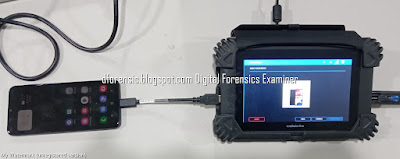
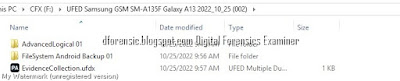
Mobile Forensics:How to Extract Evidence From Samsung Galaxy A13

 Mobile Forensics:How to Extract Evidence From Samsung Galaxy A13


Forensic Imaging & DATA Extraction

Evidence Intake Phase 

Mobile Forensics:How to Extract Evidence


Mobile Forensics:How to Extract Evidence


Mobile Forensics:How to Extract Evidence

Mobile Forensics:How to Extract Evidence


Mobile Forensics:How to Extract Evidence


Identification Phase
The purpose of the forensic examination
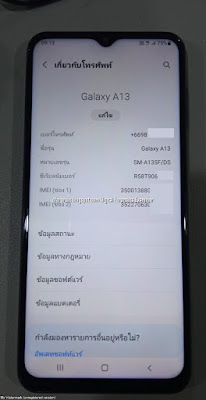
The information regarding manufacture, model and type of the Android devices should be identified

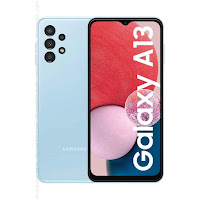
Samsung Galaxy A13
Mobile Forensics:How to Extract Evidence


Brand

Samsung

Device Name/ Model number

 Samsung Galaxy / SM-A135F

Android Version

 Android 12

Baseband version

 SP1A.210812.016.A135FXXU2AV

Kernel Version

 4.19198

Build Number  

 SP1A.210812.016.A135FXXU2AVJ3

Serial Number

 -

MicroSD Card

 64

Mobile Forensics:How to Extract Evidence

Preparation Phase


How to Prepare an Android Device for Acquisition

  • Cellebrite  Physical Analyzer 7.30.0.228
  • Cellebrite UFED 7.58.0172
  • Samsung Galaxy A13
  • USB Cable 170
  • Lenovo Workstation 


Isolation Phase

Before the examination, Android devices should be isolated from networks that can be connected with Android devices via wireless (Wi-Fi), infrared and Bluetooth network capabilities. Isolation of the mobile from these communication sources is a significant phase before examination because it prevents the adding of new data to the phone during new calls and texting. Remote wiping or remote access

Mobile Forensics:How to Extract Evidence


Mobile Forensics:How to Extract Evidence

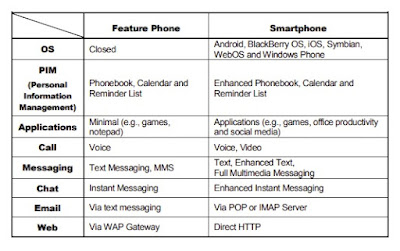
Summary of types of data that can be extracted using logical, file system and physical extraction. Source: Cellebrite article

Mobile Forensics:How to Extract Evidence


Mobile Forensics:How to Extract Evidence

Mobile Forensics:How to Extract Evidence

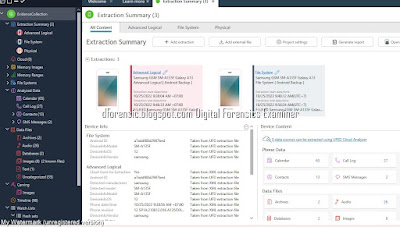
UFED Physical Analyzer Examination

Mobile Forensics:How to Extract Evidence

Data specification of Android mobile device.


Mobile Forensics:How to Extract Evidence

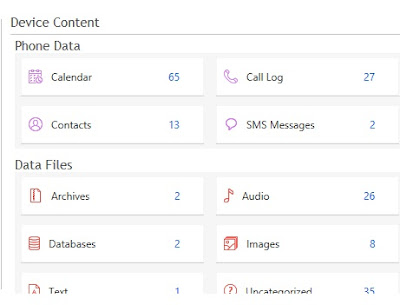
Evidence Collection
Mobile Forensics:How to Extract Evidence

Mobile Forensics:How to Extract Evidence

SMS  Message
Mobile Forensics:How to Extract Evidence
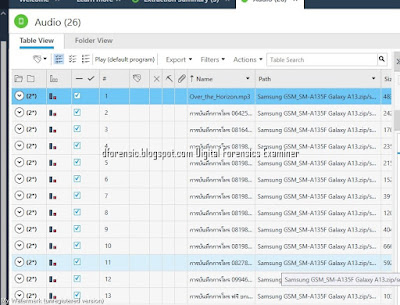
Audio 
Mobile Forensics:How to Extract Evidence
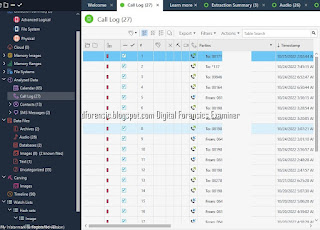
Call Log
Mobile Forensics:How to Extract Evidence
Images
Mobile Forensics:How to Extract Evidence
Calendar
Mobile Forensics:How to Extract Evidence

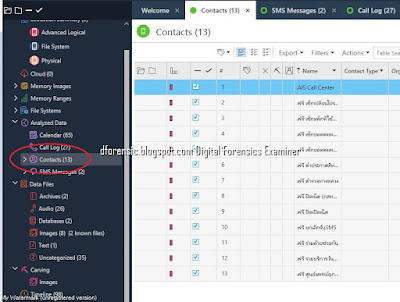
Contact 
Mobile Forensics:How to Extract Evidence
Verification Phase 
The Image Hash Details dialog displays the comparison result of the reference and calculated hash values of each image.

Mobile Forensics:How to Extract Evidence

Documentation and Reporting Phase

Documentation and Reporting Phase


Mobile Forensics Report

Mobile Forensics:How to Extract Evidence
Selective File System Extraction in Cellebrite UFED


ขั้นตอนการตรวจสอบพิสูจน์พยานหลักฐานทางดิจิทัล ( DIGITAL FORENSICS )เป็นอย่างไร

 
ที่มา:@sureandshare
 
อ่านเพิ่มเติม How to Extract Evidence From HUAWEI Device


หมายเหตุ:เนื้อหาในเว็บไซต์นี้มีขึ้นเพื่อวัตถุประสงค์ในการให้ข้อมูลและเพื่อการศึกษาเท่านั้น

* หากมีข้อมูลข้อผิดพลาดประการใด ขออภัยมา ณ ที่นี้ด้วย  รบกวนแจ้ง Admin เพื่อแก้ไขต่อไป
ขอบคุณครับ

#WindowsForensic #computerforensic #ComputerForensics #dfir #forensics #digitalforensics #investigation #cybercrime #fraud


Wednesday, April 6, 2022

Mobile Forensics:MAGNET AXIOM ACQUIRING ANDROID

Mobile Forensics:Magnet AXIOM Acquiring Android

การตรวจพิสูจน์อุปกรณ์สื่อสารเคลื่อนที่ที่ใช้ระบบปฏิบัติการแอนดรอยด์

Forensic Imaging & DATA Extraction

Magnet AXIOM

Magnet AXIOM is another powerful, commercial digital forensic product capable of acquiring, processing. and analyzing mobile devices, including those running Android operating systems.

Mobile Forensics ACQUIRING ANDROID

(Lenovo TAB M8 TB-8505X ) Android OS 10 

Mobile Forensics ACQUIRING ANDROID


How to enable the hidden Developer options and USB debugging

Developer options are used by developers to do system test. To avoid misuse, Android system 

automatically hides Developer options. To enable it, refer to below steps:

  1. Touch Advanced Menu on Home screen.
     
  2. Tap Settings.
     
  3. Tap About tablet.
     
  4. Seven taps on Build number until “You are now a developer” or “No need, you are already a developer” pops out.
     
  5. Tap Developer options on Settings interface.
     
  6. Turn on USB debugging.
     
  7. Tap OK to allow USB debugging.

USB debugging option

However, this may not be the case with all the devices, as different devices have different environments and configuration features. Sometimes, the examiner might have to use certain techniques to access the Developer Options on a few devices. These techniques are device-specific and need to be researched and determined by the forensic analyst based on the device type and model.

Mobile Forensics ACQUIRING ANDROID


Step 1.Creating a case in Magnet AXIOM
To create a case in Magnet AXIOM, perform the following steps:

Start AXIOM Process and click the CREATE NEW CASE button:

The first windows is CASE DETAILS; here we have to fill in a few fields, such as case number, type, path to case files, and acquired data:

Step 2. Evidence Sources  > Mobile
Mobile Forensics ACQUIRING ANDROID


Step 3. Select Evidence Source >ANDRIOD
The EVIDENCE SOURCES window allows the examiner to choose the data source or acquire an image directly from the device...
Mobile Forensics ACQUIRING ANDROID

Step 4. Select An acquisition Method > ADB(Unlocked)

Mobile Forensics ACQUIRING ANDROID

Step 5. Select Device>Lenovo TB-8505X
Mobile Forensics ACQUIRING ANDROID

Step 6. Select Image Type > Quick
Mobile Forensics ACQUIRING ANDROID

Step 7. Analyze Evidence >Sources to Process
Mobile Forensics ACQUIRING ANDROID

Step 8. Evidence Overview
Mobile Forensics ACQUIRING ANDROID
Information
Mobile Forensics ACQUIRING ANDROID


Step 9. Matching Results
Android SMS/MMS
Mobile Forensics ACQUIRING ANDROID

Camera History
Mobile Forensics ACQUIRING ANDROID


Installed Applications
Mobile Forensics ACQUIRING ANDROID

Identifiers People
Mobile Forensics ACQUIRING ANDROID


How to acquire an Android phone using Magnet AXIOM

"MAGNET AXIOM ACQUIRING ANDROID",YouTube,Uploaded by Magnet Forensics,


อ่านเพิ่มเติม: Mobile Forensics: MAGNET AXIOM

                  Learning Android Forensics - Second Edition

 หมายเหตุ:เนื้อหาในเว็บไซต์นี้มีขึ้นเพื่อวัตถุประสงค์ในการให้ข้อมูลและเพื่อการศึกษาเท่านั้น


* หากมีข้อมูลข้อผิดพลาดประการใด ขออภัยมา ณ ที่นี้ด้วย  รบกวนแจ้ง Admin เพื่อแก้ไขต่อไป
ขอบคุณครับ

#WindowsForensic #computerforensic #ComputerForensics #dfir #forensics
#digitalforensics #investigation #cybercrime #fraud

Monday, September 27, 2021

Mobile Forensics:How to Extract Evidence From HUAWEI Devices

Mobile Forensics:How to Extract Evidence From HUAWEI Devices

Mobile Forensics:How to Extract Evidence From Samsung Devices

วันนี้มาทดสอบการดึงข้อมูลออกจาก โทรศัพท์ HUAWEI Y7 Pro 2019  โดยใช้ Cellebrite UFED  Version: 7.5.1.850

Forensic Imaging & DATA Extraction

Cellebrite ผู้ผลิต Universal Forensic Extraction Device (UFED) อุปกรณ์ดึงข้อมูลจากอุปกรณ์เคลื่อนที่เช่นโทรศัพท์เคลื่อนที่และแท็บเล็ต

Forensic Imaging & DATA Extraction
เราสามารถเลือก Auto detect  เพื่อให้ Cellebrite ค้นหารุ่นของโทรศัพท์โดยอัตโนมัติ
Forensic Imaging & DATA Extraction

Forensic Imaging & DATA Extraction

Forensic Imaging & DATA Extraction

Mobile Forensics

Mobile Forensics
ทำการดึงข้อมูลเสร็จสิ้น
Mobile Forensics

ที่มา:https://www.cellebrite.com 

หมายเหตุ:เนื้อหาในเว็บไซต์นี้มีขึ้นเพื่อวัตถุประสงค์ในการให้ข้อมูลและเพื่อการศึกษาเท่านั้น

* หากมีข้อมูลข้อผิดพลาดประการใด ขออภัยมา ณ ที่นี้ด้วย  รบกวนแจ้ง Admin เพื่อแก้ไขต่อไป
ขอบคุณครับ

#WindowsForensic #computerforensic #ComputerForensics #dfir #forensics #digitalforensics #investigation #cybercrime #fraud

Volatility Lab

Volatility Lab  Image Wanna.vmem P.73 windows.info #python3  vol.py   -f '/home/kali/Desktop/Wanna/Wanna-MEM.vmem' windows.info     ...