Showing posts with label Steganography. Show all posts

Friday, May 5, 2023

Digital Forensics: Steganography

Digital Forensics: Steganography III

STEGANO GRAPHY

ทฤษฎีการอำพรางข้อมูลเป็นเทคนิคใน การช่อนพรางข้อมูลเข้าไปในแฟ้ม คอมพิวเตอร์รวมถึงสื่ออื่น ๆ โดยใช เทคนิคต่าง ๆการเรียนรู้ทฤษฎีการ อำพรางข้อมูลเพื่อให้ผู้เรียนสามารถ ประยุกต์ใช้เทคนิคเหล่านี้ในงานต่าง ๆ ได้อย่างมีประสิทธิภาพ รวมถึงสามารถ ตรวจสอบความผิดปกติของข้อมูล ที่มี สารสนเทศอื่น ๆ ช่อนอยู่ภายในได้

วิทยาการอำพรางข้อมูล

ความแตกต่างของวิทยาการอำพรางข้อมูล กับวิทยาการเข้ารหัสลับ
STEGANO GRAPHY

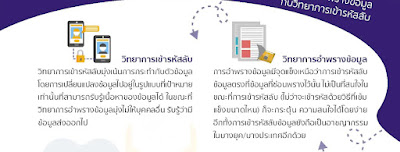
วิทยาการเข้ารหัสลับ วิทยาการเข้ารหัสลับมุ่งเน้นการกระทำกับตัวข้อมูล โดยการเปลี่ยนแปลงข้อมูลไปอยู่ในรูปแบบที่เป้าหมาย เท่านั้นที่สามารถรับรู้เนื้อหาของข้อมูลได้ ในขณะที่ วิทยาการอำพรางข้อมูลมุ่งไม่ให้บุคคลอื่น รับรู้ว่ามี ข้อมูลส่งออกไป

วิทยาการอำพรางข้อมูล การอำพรางข้อมูลมีจุดแข็งเหนือว่าการเข้ารหัสลับข้อมูลตรงที่ข้อมูลที่ซ่อนพรางไว้นั้นไม่เป็นที่สนใจใน ขณะที่การเข้ารหัสลับ ไม่ว่าจะเข้ารหัสด้วยวิธีที่เข้ม แข็งขนาดไหน) ก็จะกระตุ้น ความสนใจได้โดยง่าย อีกทั้งการเข้ารหัสลับข้อมูลยังถือเป็นอาชญากรรม ในบางยุค/บางประเทศอีกด้วย

Steganography

การใช้วิทยาการอำพรางข้อมูลอย่างถูกต้องตามกฎหมาย 

เจ้าหน้าที่ของรัฐ อาทิ ตำรวจ หน่วยข่าวกรอง) ที่ปฏิบัติหน้าที่ตามกฎหมายสามารถ ตรวจ สอบการค้ายาพอนาจารของเด็ก การฉ้อโกงทางบัญชี การขโมยข้อมูลประจำตัว และการก่อการร้ายได้โดยไม่ขัดต่อกฎหมาย

การใช้วิทยาการอ้าพรางข้อมูลอย่างผิดจรรยาบรรณ

วิทยาการว่าพรางข้อมูล สามารถใช้เพื่อวัตถุประสงค์ที่ผิดจรรยาบรรณหลายประการ อาทิ การฉ้อโกง การเช็ก การพนัน การชื่อขายภาพอนาจาร การล่วงละเมิดทรัพย์สิน ทางปัญญา อาชญากรไซเบอร์อาจใช้แฟ้ม พรางที่มีมัลแวร์บรรจุอยู่ภายในเป็นเครื่อง มือในการส่งมอบมัลแวร์ไปสู่เป้าหมายโดยระบบตรวจสอบมัลแวร์ และ anti-virus ไม่ สามารถตรวจสอบได้


อ่านเพิ่มเติม


ที่มา Thaicert , NCSA

หมายเหตุ:เนื้อหาในเว็บไซต์นี้มีขึ้นเพื่อวัตถุประสงค์ในการให้ข้อมูลและเพื่อการศึกษาเท่านั้น

* หากมีข้อมูลข้อผิดพลาดประการใด ขออภัยมา ณ ที่นี้ด้วย  รบกวนแจ้ง Admin เพื่อแก้ไขต่อไป
ขอบคุณครับ

#WindowsForensic #computerforensic #ComputerForensics #dfir #forensics
#digitalforensics #investigation #cybercrime #fraud #Steganography

Friday, May 14, 2021

Online EXIF GPS Steganography

 Online EXIF GPS Steganography

Use this tool to encode a short message inside the EXIF GPS data of an image. Everything is processed locally within your browser.

exif-samples


Steganography tools


Credit:

lucasn-dev.github.io

https://github.com/ianare/exif-samples


หมายเหตุ:เนื้อหาในเว็บไซต์นี้มีขึ้นเพื่อวัตถุประสงค์ในการให้ข้อมูลและเพื่อการศึกษาเท่านั้น

* หากมีข้อมูลข้อผิดพลาดประการใด ขออภัยมา ณ ที่นี้ด้วย  รบกวนแจ้ง Admin เพื่อแก้ไขต่อไป
ขอบคุณครับ


#WINDOWSFORENSIC #COMPUTERFORENSICS #DFIR #FORENSICS #DIGITALFORENSICS #COMPUTERFORENSIC #INVESTIGATION #CYBERCRIME #FRAUD #ฝึกทำLAB #CTF

Saturday, July 13, 2019

DIGITAL FORENSICS:Steganography tools

DIGITAL FORENSICS:Steganography  tools


Steganography - A list of useful tools and resources

Steganography is hiding a file or a message inside of another file , there are many fun steganography CTF challenges out there where the flag is hidden in an image , audio file or even other types of files. Here is a list of the most tools I use and some other useful resources.
Note : This list will be updated regularly , feel free to pm if you have any suggestions

Tools

Steghide

Steghide is a steganography program that hides data in various kinds of image and audio files , only supports these file formats : JPEG, BMP, WAV and AU. but it’s also useful for extracting embedded and encrypted data from other files.
It can be installed with apt however the source can be found on github.
Useful commands:
steghide info file : displays info about a file whether it has embedded data or not.
steghide extract -sf file : extracts embedded data from a file

Foremost

Foremost is a program that recovers files based on their headers , footers and internal data structures , I find it useful when dealing with png images.
It can be installed with apt however the source can be found on github.
Useful commands:
foremost -i file : extracts data from the given file.

Stegsolve

Sometimes there is a message or a text hidden in the image itself and in order to view it you need to apply some color filters or play with the color levels. You can do it with GIMP or Photoshop or any other image editing software but stegsolve made it easier. it’s a small java tool that applies many color filters on images. Personally i find it very useful
You can get it from github

Strings

Strings is a linux tool that displays printable strings in a file. That simple tool can be very helpful when solving stego challenges. Usually the embedded data is password protected or encrypted and sometimes the password is actaully in the file itself and can be easily viewed by using strings
It’s a default linux tool so you don’t need to install anything.
Useful commands:
strings file : displays printable strings in the given file.

Exiftool

Sometimes important stuff is hidden in the metadata of the image or the file , exiftool can be very helpful to view the metadata of the files.
You can get it from here
Useful commands:
exiftool file : shows the metadata of the given file

Exiv2

A tool similar to exiftool.
It can be installed with apt however the source can be found on github.
Official website
Useful commands:
exiv2 file : shows the metadata of the given file

Binwalk

Binwalk is a tool for searching binary files like images and audio files for embedded files and data.
It can be installed with apt however the source can be found on github.
Useful commands:
binwalk file : Displays the embedded data in the given file
binwalk -e file : Displays and extracts the data from the given file

Zsteg

zsteg is a tool that can detect hidden data in png and bmp files.
to install it : gem install zsteg , The source can be found on github
Useful commands:
zsteg -a file : Runs all the methods on the given file
zsteg -E file : Extracts data from the given payload (example : zsteg -E b4,bgr,msb,xy name.png)

Wavsteg

WavSteg is a python3 tool that can hide data and files in wav files and can also extract data from wav files.
You can get it from github
Useful commands:
python3 WavSteg.py -r -s soundfile -o outputfile : extracts data from a wav sound file and outputs the data into a new file

Sonic visualizer

Sonic visualizer is a tool for viewing and analyzing the contents of audio files, however it can be helpful when dealing with audio steganography. You can reveal hidden shapes in audio files.
Offical Website

Web Tools

Unicode Text Steganography

A web tool for unicode steganography , it can encode and decode text.

npiet online

an online interpreter for piet. piet is an esoteric language , programs in piet are images. read more about piet here

dcode.fr

Sometimes when solving steganography challenges you will need to decode some text. dcode.fr has many decoders for a lot of ciphers and can be really helpful.

Bruteforcers

StegCracker

A tool that bruteforces passwords using steghide

Fcrackzip

Sometimes the extracted data is a password protected zip , this tool bruteforces zip archives.
It can be installed with apt however the source can be found on github.
Useful commands:
fcrackzip -u -D -p wordlist.txt file.zip : bruteforces the given zip file with passwords from the given wordlist
หมายเหตุ:เนื้อหาในเว็บไซต์นี้มีขึ้นเพื่อวัตถุประสงค์ในการให้ข้อมูลและเพื่อการศึกษาเท่านั้น

* หากมีข้อมูลข้อผิดพลาดประการใด ขออภัยมา ณ ที่นี้ด้วย  รบกวนแจ้ง Admin เพื่อแก้ไขต่อไป
ขอบคุณครับ


#WINDOWSFORENSIC #COMPUTERFORENSICS #DFIR #FORENSICS #DIGITALFORENSICS #COMPUTERFORENSIC #INVESTIGATION #CYBERCRIME #FRAUD #ฝึกทำLAB #CTF
Monday, December 29, 2014

Digital Forensics: Steganography Part II

Digital Forensics: Steganography Part II


Steganography คือ เทคนิคในการซ่อนข้อมูลที่ ต้องการรักษาความลับไว้ในข้อมูลอื่นที่มีขนาดใหญ่กว่า ผู้ที่ไม่รู้วิธีซ่อนข้อมูลจะไม่สามารถอ่านข้อมูลที่ซ่อนอยู่นั้นได้ เช่น การซ่อนข้อความไว้ในไฟล์รูปภาพ โดยการแทนที่ข้อมูลในบิตสุดท้ายของแต่ละพิกเซลด้วยบิตของข้อความที่เป็นความลับ

ตัวอย่างเช่น ในกรณีที่สายลับมีการส่งจดหมายติดต่อไปยังหน่วยงานของตน สมมติจดหมายที่ถูกส่งไปนั้นถูกเปิดตรวจสอบระหว่างทาง หากข้อความถูกเข้ารหัสไว้ก็อาจก่อให้เกิดความสงสัยแก่ผู้ตรวจสอบว่า จดหมายนี้อาจมีข้อความที่เป็นความลับอยู่ แต่หากในจดหมายนั้นใช้วิธีการอำพรางข้อมูล ในการซ่อนข้อความแล้ว ข้อความในจดหมายนั้นก็เสมือนกับจดหมายทั่วไป ไม่มีสิ่งที่เป็นจุดน่าสงสัย


กลุ่มอาชญากรทางไซเบอร์  สามารถใช้เทคนิคนี้ในการซ่อนข้อมูลที่ขโมยออกมาได้ไว้ในไฟล์รูปภาพหรือไฟล์วิดีโอ จากนั้นส่งออกไปผ่านช่องทางปกติ หรือเขียนมัลแวร์ที่ติดต่อกับเซิร์ฟเวอร์ที่ใช้ควบคุมและสั่งการโดยใช้วิธีอำพรางข้อมูลเพื่อหลีกเลี่ยงระบบตรวจจับมัลแวร์ได้
การจะวิเคราะห์ว่าไฟล์ต้องสงสัยมีการใช้เทคนิค Steganography เพื่อซ่อนอำพรางข้อมูลหรือไม่นั้นอาจต้องใช้กระบวนการทางคณิตศาสตร์และสถิติเข้ามาช่วย เช่น ตรวจสอบ histrogram เพื่อหารูปแบบการกระจายตัวของข้อมูลที่ผิดปกติ อย่างไรก็ตาม เนื่องจากต้องอาศัยวิธีการที่ค่อนข้างซับซ้อน เครื่องมือที่มีอยู่ในปัจจุบันก็อาจยังไม่สามารถตรวจจับกระบวนการเหล่านี้ได้ทั้งหมด ซึ่งก็เป็นอีกหนึ่งความท้าทายที่ต้องเตรียมพร้อมรับมือในอนาคต


เครื่องมือที่ใช้เทคนิค Steganography

OpenStego - http://www.openstego.info/

OpenStego provides two main functionalities:
  • Data Hiding: It can hide any data within a cover file (e.g. images).
  • Watermarking (beta): Watermarking files (e.g. images) with an invisible signature. It can be used to detect unauthorized file copying.


Steghide - http://steghide.sourceforge.net/download.php


StegFS - http://sourceforge.net/projects/stegfs/


pngcheck - http://www.libpng.org/pub/png/apps/pngcheck.html


pngcheck verifies the integrity of PNG, JNG and MNG files (by checking the internal 32-bit CRCs [checksums] and decompressing the image data); it can optionally dump almost all of the chunk-level information in the image in human-readable form. For example, it can be used to print the basic statistics about an image (dimensions, bit depth, etc.); to list the color and transparency info in its palette (assuming it has one); or to extract the embedded text annotations. This is a command-line program with batch capabilities. 


GIMP - http://www.gimp.org/downloads/
How to Hide Text and Images in Pictures 


Audacity - http://audacity.sourceforge.net/download


MP3Stego - http://www.petitcolas.net/steganography/mp3stego


ffmpeg (for video analysis) - https://www.ffmpeg.org/download.html


ที่มา https://bit.ly/2I8iv4P
https://bit.ly/2GDxrWf
https://bit.ly/2GlsYIk
https://bit.ly/2MYKH91
https://bit.ly/2RS6Bvv 

https://bit.ly/2RWd1cL
https://bit.ly/2tiyaEr
https://bit.ly/2Dtpb7W

Digital Forensics: Steganography Part I

หมายเหตุ:เนื้อหาในเว็บไซต์นี้มีขึ้นเพื่อวัตถุประสงค์ในการให้ข้อมูลและเพื่อการศึกษาเท่านั้น

* หากมีข้อมูลข้อผิดพลาดประการใด ขออภัยมา ณ ที่นี้ด้วย  รบกวนแจ้ง Admin เพื่อแก้ไขต่อไป
ขอบคุณครับ

#WindowsForensic #computerforensic #ComputerForensics #dfir #forensics #digitalforensics #investigation #cybercrime #fraud #windowsforensics

Monday, September 30, 2013

Digital Forensics: Steganography

Digital Forensics: Steganography Part I


วันนี้ Admin  นำเสนอ Steganography Detect  โดยไม่ต้องติดตั้งโปรแกรม แค่ใช้งานผ่านwebsite 


Steganography คือ  

เทคนิคในการซ่อนข้อมูลที่ ต้องการรักษาความลับไว้ในข้อมูลอื่นที่มีขนาดใหญ่กว่า ผู้ที่ไม่รู้วิธีซ่อนข้อมูลจะไม่สามารถอ่านข้อมูลที่ซ่อนอยู่นั้นได้ เช่น การซ่อนข้อความไว้ในไฟล์รูปภาพ โดยการแทนที่ข้อมูลในบิตสุดท้ายของแต่ละพิกเซลด้วยบิตของข้อความที่เป็นความลับ

Steganography คือ

 เป็นเทคนิคการซ่อนข้อมูลลับไว้ในสื่อที่ไม่ได้เป็นความลับ โดยมีจุดประสงค์เพื่ออำพรางให้ตรวจสอบความผิดปกติได้ยาก ตัวอย่างการใช้งานเทคนิคนี้ เช่น ซ่อนข้อมูลลับไว้ในไฟล์รูปภาพ ซึ่งผู้ที่เปิดดูไฟล์นี้ก็จะเห็นเป็นรูปภาพปกติ แต่ผู้ที่รู้ว่าภาพนี้มีข้อมูลซ่อนอยู่ก็สามารถใช้วิธีเฉพาะในการสกัดข้อมูลที่ซ่อนไว้ออกมาได้ ซึ่งที่ผ่านมาก็ได้มีผู้พัฒนามัลแวร์หลายรายนำเทคนิคนี้มาใช้เป็นส่วนประกอบการโจมตีอยู่เรื่อยๆ

1. เข้าไปที่ Website  link: https://bit.ly/2NQlH2g
 2. นำรูปที่สงสัยว่ามีการซ่อนข้อมูลในรูปหรือ อำพรางข้อมูล Steganography
                                                   ตัวอย่างไฟล์  stg300.png


3.  ให้ท่านนำไฟล์ตัวอย่าง  stg300.png Upload บนเว็บเพื่อวิเคราะห์ ตามรูป
 รูปต้องมีขนาดไม่เกิน 1 MB 1024 x 768
   
 4. รอผลการวิเคราะห์
5. ดูผลลัพถ์ ที่ได้ พบว่าไฟล์รูป มีการใช้เทคนิค   Steganography

Digital Forensics: Steganography Part II

ที่มา :
https://bit.ly/2NT7RMO
https://bit.ly/2NQlH2g

หมายเหตุ:เนื้อหาในเว็บไซต์นี้มีขึ้นเพื่อวัตถุประสงค์ในการให้ข้อมูลและเพื่อการศึกษาเท่านั้น

* หากมีข้อมูลข้อผิดพลาดประการใด ขออภัยมา ณ ที่นี้ด้วย  รบกวนแจ้ง Admin เพื่อแก้ไขต่อไป
ขอบคุณครับ

#WindowsForensic #computerforensic #ComputerForensics #dfir #forensics
#digitalforensics #investigation #cybercrime #fraud
#Steganography Analysis

Volatility Lab

Volatility Lab  Image Wanna.vmem P.73 windows.info #python3  vol.py   -f '/home/kali/Desktop/Wanna/Wanna-MEM.vmem' windows.info     ...