Digital forensic examiners are investigators who are experts in gathering, recovering, analyzing, and presenting data evidence from computers and other digital media related to computer-based .They might work on cases concerning identity theft, electronic fraud,investigation of material found in digital devices ,electronic evidence, often in relation to cyber crimes.
Data leaks are a growing risk to organisations. The size and complexity of data obtained and held by organisations increases the vulnerability of a company.
To help organisations better manage their data, we’ve developed a robust approach which helps to identify the source of a confidential or sensitive data leak.
We’ve invested heavily in market-leading forensic tools to provide fast and insightful results during the critical period following a data breach or information leak. This can help clients get to the bottom of an issue quicker. We work with leading providers who are experts in the field of digital forensics.
* The RAW ISO file is a raw sector-by-sector binary copy of tracks in the original disk, and the CUE file is a plain-text file which stores the information of disk and tracks.
- Seed files stored in RM#1 and a shared network drive - Base files for creating seed files were randomly selected from Govdocs1 - The first page of each seed file was manually added - Seed file list and hash values
Digital Forensic Practice Points
The followings are the summary of detailed practice points related to above images.
- Windows event logs - Opened files and directories - Application (executable) usage history - CD/DVD burning records - External devices attached to PC - Network drive connection traces - System Caches - Windows Search databases - Volume Shadow Copy
- History, Cache, Cookie - Internet usage history (URLs, Search Keywords…)
E-mail Forensics
- MS Outlook file examination - E-mails and attachments
Database Forensics
- MS Extensible Storage Engine (ESE) Database - SQLite Database
Deleted Data Recovery
- Metadata based recovery - Signature & Content based recovery (aka Carving) - Recycle Bin of Windows - Unused area examination
User Behavior Analysis
- Constructing a forensic timeline of events - Visualizing the timeline
Questions
What are the hash values (MD5 & SHA-1) of all images? Does the acquisition and verification hash value match?
Identify the partition information of PC image.
Explain installed OS information in detail. (OS name, install date, registered owner…)
What is the timezone setting?
What is the computer name?
List all accounts in OS except the system accounts: Administrator, Guest, systemprofile, LocalService, NetworkService. (Account name, login count, last logon date…)
Who was the last user to logon into PC?
When was the last recorded shutdown date/time?
Explain the information of network interface(s) with an IP address assigned by DHCP.
What applications were installed by the suspect after installing OS?
List application execution logs. (Executable path, execution time, execution count...)
List all traces about the system on/off and the user logon/logoff. (It should be considered only during a time range between 09:00 and 18:00 in the timezone from Question 4.)
What web browsers were used?
Identify directory/file paths related to the web browser history.
What websites were the suspect accessing? (Timestamp, URL...)
List all search keywords using web browsers. (Timestamp, URL, keyword...)
List all user keywords at the search bar in Windows Explorer. (Timestamp, Keyword)
What application was used for e-mail communication?
Where is the e-mail file located?
What was the e-mail account used by the suspect?
List all e-mails of the suspect. If possible, identify deleted e-mails. (You can identify the following items: Timestamp, From, To, Subject, Body, and Attachment) [Hint: just examine the OST file only.]
List external storage devices attached to PC.
Identify all traces related to ‘renaming’ of files in Windows Desktop. (It should be considered only during a date range between 2015-03-23 and 2015-03-24.) [Hint: the parent directories of renamed files were deleted and their MFT entries were also overwritten. Therefore, you may not be able to find their full paths.]
What is the IP address of company’s shared network drive?
List all directories that were traversed in ‘RM#2’.
List all files that were opened in 'RM#2’.
List all directories that were traversed in the company’s network drive.
List all files that were opened in the company’s network drive.
Find traces related to cloud services on PC. (Service name, log files...)
What files were deleted from Google Drive? Find the filename and modified timestamp of the file. [Hint: Find a transaction log file of Google Drive.]
Identify account information for synchronizing Google Drive.
What a method (or software) was used for burning CD-R?
When did the suspect burn CD-R? [Hint: It may be one or more times.]
What files were copied from PC to CD-R? [Hint: Just use PC image only. You can examine transaction logs of the file system for this task.]
What files were opened from CD-R?
Identify all timestamps related to a resignation file in Windows Desktop. [Hint: the resignation file is a DOCX file in NTFS file system.]
How and when did the suspect print a resignation file?
Where are ‘Thumbcache’ files located?
Identify traces related to confidential files stored in Thumbcache. (Include ‘256’ only)
Where are Sticky Note files located?
Identify notes stored in the Sticky Note file.
Was the ‘Windows Search and Indexing’ function enabled? How can you identify it? If it was enabled, what is a file path of the ‘Windows Search’ index database?
What kinds of data were stored in Windows Search database?
Find traces of Internet Explorer usage stored in Windows Search database. (It should be considered only during a date range between 2015-03-22 and 2015-03-23.)
List the e-mail communication stored in Windows Search database. (It should be considered only during a date range between 2015-03-23 and 2015-03-24.)
List files and directories related to Windows Desktop stored in Windows Search database. (Windows Desktop directory: \Users\informant\Desktop\)
Where are Volume Shadow Copies stored? When were they created?
Find traces related to Google Drive service in Volume Shadow Copy. What are the differences between the current system image (of Question 29 ~ 31) and its VSC?
What files were deleted from Google Drive? Find deleted records of cloud_entry table inside snapshot.db from VSC. (Just examine the SQLite database only. Let us suppose that a text based log file was wiped.) [Hint: DDL of cloud_entry table is as follows.]


 Investigation Outcomes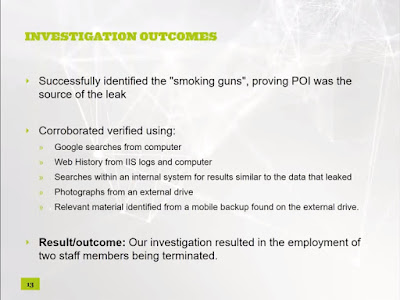

 THE Challenges Initially Faced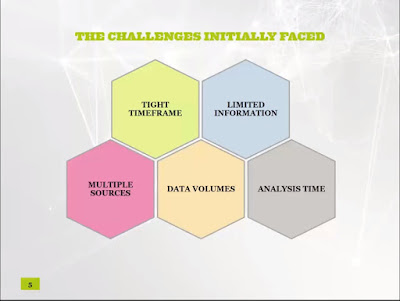


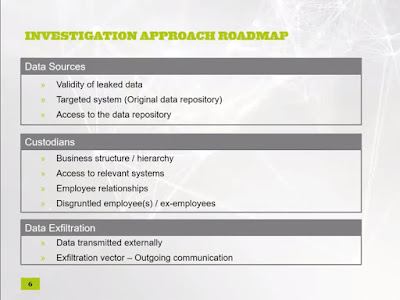 Initial analysis summary
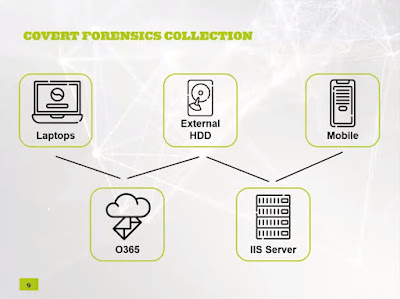 Analysis of POI Devices


