Showing posts with label Mobile Forensics. Show all posts

Friday, March 13, 2026

Digital Forensics:Timestamp Decoder

Digital Forensics:Timestamp Decoder

Mobile Forensics Lab I


Digital Forensics:Timestamp Decoder
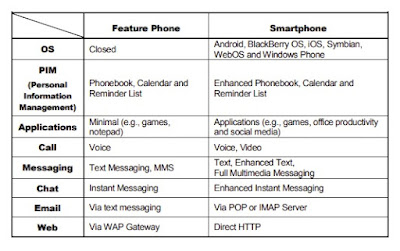
Mobile Phone Forensics

What is Timestamp Decoder?

Timestamp Decoder  is a FREE forensic utility for converting data found on desktop and mobile devices into human-readable timestamps. It is the most comprehensive tool available for decoding timestamps.

To open this case in the software, an investigator would launch Autopsy, click Open Case, and select this Drug_Dealer.aut file.

The Target Evidence: You can see that the  archive (J8AXB7647798GRJ-20210421_0920.tar), which was added as a Logical File data source in your earlier steps, is successfully reloaded and mapped under the LogicalFileSet1 host directory.

Step 1: Navigating the File System (Data Sourcing)
Path: com.android.providers.calendar -> databases
This directory contains the database files responsible for storing the device's native calendar data.

Step 2: Selecting the Target Database

In the top-center Listing panel, the database file has been selected:

  • File Name: calendar.db

  • File Path: The full path at the top reveals it originates from the ingested logical file extraction: /LogicalFileSet1/Image/J8AXB7647798GRJ-20210421_0920.tar/data/data/com.android.providers.calendar/databases

Step 3: Utilizing the Built-In SQLite Viewer

Instead of viewing raw data, the investigator clicked the Application tab in the lower content viewer pane.

  • Autopsy automatically recognizes that calendar.db is an SQLite database.

Step 4: Analyzing the Target Evidence Row

The investigator has highlighted Row 36, which contains highly relevant data for the case:

  • title: The entry is named "Pizza delivery". (In drug investigations, this is often a code word used for a transaction/drop-off).

  • eventLocation: Autopsy extracts GPS coordinates directly from this field: 33.529455426023574, -112.0847381568517. This allows investigators to pinpoint exactly where the meeting was planned to take place on a map.

  • dtstart / dtend: These columns contain the Unix Epoch Timestamps (1618039800000)


To convert the Unix timestamp identified in your forensic evidence, follow these step-by-step

Option 1: Using DCode (Forensic Tool)

DCode is a specialized tool for investigators to handle multiple timestamp formats.

Digital Forensics:Timestamp Decoder

  1. Select Format: In the Decode Format dropdown, select Unix: Numeric Value.

  2. Set Time Zone: Ensure Add Bias is set to UTC 00:00 for a standard forensic report.

  3. Input Value: Type or paste 1618039800000 into the Value to Decode field.

  4. Execute: Click the Decode button.

  5. Result: The Date & Time field will display Sat, 10 April 2021 07:30:00 UTC.


Option 2: Using EpochConverter (Online)

Digital Forensics:Timestamp Decoder

  1. Input: Enter 1618039800000 into the main conversion box.

  2. Convert: Click Timestamp to readable date.

  3. Check Precision: The tool will automatically assume the timestamp is in milliseconds because it is 13 digits long.

  4. Result: It will show the date as Saturday, April 10, 2021 at 7:30:00 AM GMT.

Option 3: Using CyberChef (Advanced Web Tool)  https[:]//gchq.github[.]io/CyberChef


Digital Forensics:Timestamp Decoder

  1. Select Category: Click on Date / Time in the left-hand operations pane.

  2. Choose Recipe: Drag From UNIX Timestamp into the Recipe column.

  3. Configure Units: In the recipe options, change the Units dropdown to Milliseconds (ms).

  4. Input Data: Paste 1618039800000 into the Input box on the top right.

  5. Result: The converted time, Sat 10 April 2021 07:30:00.000 UTC, will appear instantly in the Output box.

Digital Forensics:Timestamp Decoder

อ่านเพิ่มเติม:


หมายเหตุ:เนื้อหาในเว็บไซต์นี้มีขึ้นเพื่อวัตถุประสงค์ในการให้ข้อมูลและเพื่อการศึกษาเท่านั้น ช่วยเตือนความจำ


* หากมีข้อมูลข้อผิดพลาดประการใด ขออภัยมา ณ ที่นี้ด้วย  รบกวนแจ้ง Admin เพื่อแก้ไขต่อไป
ขอบคุณครับ

#WindowsForensic #ComputerForensics #dfir #forensics #digitalforensics #computerforensic #investigation #cybercrime #fraud

Saturday, March 7, 2026

Mobile Forensics Lab IV (blockchain investigation technique)

Mobile Forensics Lab IV

Question ?

From what Bitcoin wallet did he get paid the last time for his job?

1.The WhatsApp messages give us a hint as to how much Bitcoin was sent for services ontwo occasions

2.First transmission with known tx hash was in March and it is not the latest

Mobile Forensics Lab I (blockchain investigation technique)

3.The second one is in April and it mentions an amount and then the message 'I see a bit lessthan that' (Navigate to Data Artifacts → Messages→  (msgstore.db)WhatsApp → Sort by Date/Time

Mobile Forensics Lab I (blockchain investigation technique)

Mobile Forensics Lab I (blockchain investigation technique)

The next step involves us doing a search on https://blockchair.com/bitcoin/outputs (or asimilar service) where we have to enter the evidence that we do have. We can filter by the date and time (April 15th, 2021 between 17:20 and 17:40) as well as the range of bitcoin value (0.0913 and around). This will give us the output of only one transaction that took place within those set parameters. Following that transaction link gives us our result: 

Technical Overview

The demonstrate an  blockchain investigation technique using Blockchair (a blockchain search engine and explorer). Instead of searching for a specific wallet address or Transaction Hash (TxID), the investigator is using database filtering to isolate a specific transaction based on two known parameters: Time and Approximate Value

Step-by-Step Explanation

Step 1: Accessing Advanced Search Filters  

When conducting a forensic search by timestamp, standard blockchain explorers fail because they only index by cryptographic hashes. Blockchair allows table-based queries.

Mobile Forensics Lab I (blockchain investigation technique)

  1. Activate the Time Filter: Check the Time property on the left-hand panel to open the date configuration window.

  2. Set the Condition: Change the condition to "Between". This allows you to define a specific temporal window rather than searching for an exact second (which might fail due to network propagation delays).

  3. Define the Date and Time: Select April 15, 2021 on the calendar. Check the "Include time" box to ensure the query filters down to the specific hour and minute (17:32:16 UTC).

Step 2: Applying the Value Range Filter 

Filtering by time alone on a high-traffic day like April 15, 2021, would still yield thousands of transactions (noise). To isolate the correct artifact, a second layer of filtering is applied based on the transaction amount.

Mobile Forensics Lab I (blockchain investigation technique)

Activate the Value Filter: Check the Value property on the left panel and select BTC as the currency denomination.

  1. Set a Margin of Error (Range Query): Select "Between" instead of "Exact".

  2. Input the Range: Enter a tight lower bound (0.09228260) and upper bound (0.09228263).

    Forensic Note: Using a range query is a best practice in blockchain forensics. It accounts for potential decimal roundings, miner fee deductions, or slight discrepancies in how different ledger platforms display values.

Step 3: Isolating and Analyzing the Target Output

Once you click Apply, Blockchair queries its indexed database and filters out all non-matching ledger data.

  1. Verify Active Filters: The blue tags at the top (Time (UTC) x and Value (BTC) x) confirm that the dataset is successfully restricted to your specific parameters.

Extract the Artifact: You now have the exact block number (679,370) and the partial Transaction Hash (88c1f...d07fe). Clicking on this hash will allow the investigator to trace the Input addresses (senders) and Output addresses (recipients) to map the flow of funds.

Mobile Forensics Lab I (blockchain investigation technique)

Mobile Forensics Lab I (blockchain investigation technique)

Mobile Forensics Lab I (blockchain investigation technique)


อ่านเพิ่มเติม:

Timestamp Decoder

Lab : practical exercise to map GPS coordinates extracted


หมายเหตุ:เนื้อหาในเว็บไซต์นี้มีขึ้นเพื่อวัตถุประสงค์ในการให้ข้อมูลและเพื่อการศึกษาเท่านั้น ช่วยเตือนความจำ

* หากมีข้อมูลข้อผิดพลาดประการใด ขออภัยมา ณ ที่นี้ด้วย  รบกวนแจ้ง Admin เพื่อแก้ไขต่อไป
ขอบคุณครับ

#WindowsForensic #ComputerForensics #dfir #forensics #digitalforensics #computerforensic #investigation #cybercrime #fraud

Monday, October 31, 2022

Mobile Forensics:How to Extract Evidence From Samsung Galaxy A13

 Mobile Forensics:How to Extract Evidence From Samsung Galaxy A13


Forensic Imaging & DATA Extraction

Evidence Intake Phase 

Mobile Forensics:How to Extract Evidence


Mobile Forensics:How to Extract Evidence


Mobile Forensics:How to Extract Evidence

Mobile Forensics:How to Extract Evidence


Mobile Forensics:How to Extract Evidence


Identification Phase
The purpose of the forensic examination
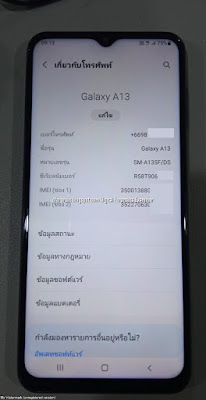
The information regarding manufacture, model and type of the Android devices should be identified

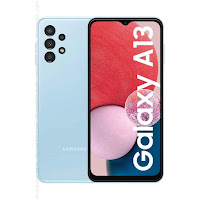
Samsung Galaxy A13
Mobile Forensics:How to Extract Evidence


Brand

Samsung

Device Name/ Model number

 Samsung Galaxy / SM-A135F

Android Version

 Android 12

Baseband version

 SP1A.210812.016.A135FXXU2AV

Kernel Version

 4.19198

Build Number  

 SP1A.210812.016.A135FXXU2AVJ3

Serial Number

 -

MicroSD Card

 64

Mobile Forensics:How to Extract Evidence

Preparation Phase


How to Prepare an Android Device for Acquisition

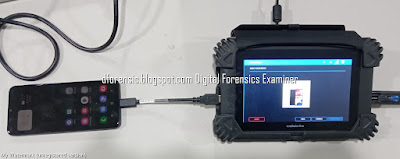
  • Cellebrite  Physical Analyzer 7.30.0.228
  • Cellebrite UFED 7.58.0172
  • Samsung Galaxy A13
  • USB Cable 170
  • Lenovo Workstation 


Isolation Phase

Before the examination, Android devices should be isolated from networks that can be connected with Android devices via wireless (Wi-Fi), infrared and Bluetooth network capabilities. Isolation of the mobile from these communication sources is a significant phase before examination because it prevents the adding of new data to the phone during new calls and texting. Remote wiping or remote access

Mobile Forensics:How to Extract Evidence


Mobile Forensics:How to Extract Evidence

Summary of types of data that can be extracted using logical, file system and physical extraction. Source: Cellebrite article

Mobile Forensics:How to Extract Evidence


Mobile Forensics:How to Extract Evidence

Mobile Forensics:How to Extract Evidence

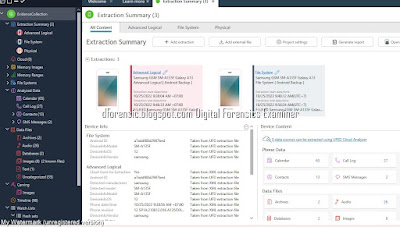
UFED Physical Analyzer Examination

Mobile Forensics:How to Extract Evidence

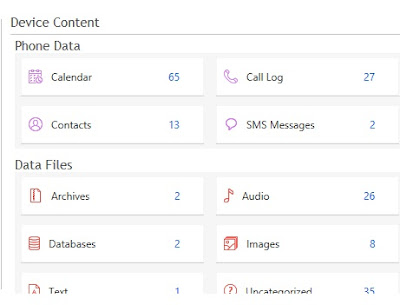
Data specification of Android mobile device.


Mobile Forensics:How to Extract Evidence

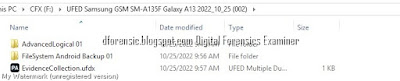
Evidence Collection
Mobile Forensics:How to Extract Evidence

Mobile Forensics:How to Extract Evidence

SMS  Message
Mobile Forensics:How to Extract Evidence
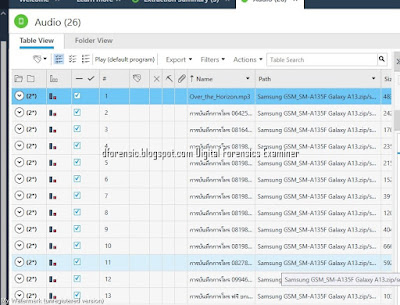
Audio 
Mobile Forensics:How to Extract Evidence
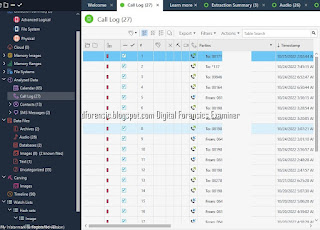
Call Log
Mobile Forensics:How to Extract Evidence
Images
Mobile Forensics:How to Extract Evidence
Calendar
Mobile Forensics:How to Extract Evidence

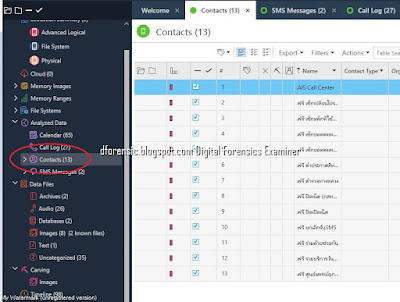
Contact 
Mobile Forensics:How to Extract Evidence
Verification Phase 
The Image Hash Details dialog displays the comparison result of the reference and calculated hash values of each image.

Mobile Forensics:How to Extract Evidence

Documentation and Reporting Phase

Documentation and Reporting Phase


Mobile Forensics Report

Mobile Forensics:How to Extract Evidence
Selective File System Extraction in Cellebrite UFED


ขั้นตอนการตรวจสอบพิสูจน์พยานหลักฐานทางดิจิทัล ( DIGITAL FORENSICS )เป็นอย่างไร

 
ที่มา:@sureandshare
 
อ่านเพิ่มเติม How to Extract Evidence From HUAWEI Device


หมายเหตุ:เนื้อหาในเว็บไซต์นี้มีขึ้นเพื่อวัตถุประสงค์ในการให้ข้อมูลและเพื่อการศึกษาเท่านั้น

* หากมีข้อมูลข้อผิดพลาดประการใด ขออภัยมา ณ ที่นี้ด้วย  รบกวนแจ้ง Admin เพื่อแก้ไขต่อไป
ขอบคุณครับ

#WindowsForensic #computerforensic #ComputerForensics #dfir #forensics #digitalforensics #investigation #cybercrime #fraud


Thursday, March 24, 2022

Mobile Forensics:free mobile training course

Mobile Forensics: free mobile training course

หลักสูตรอบรมการตรวจพิสูจน์อุปกรณ์สื่อสารเคลื่อนที่

free mobile training course

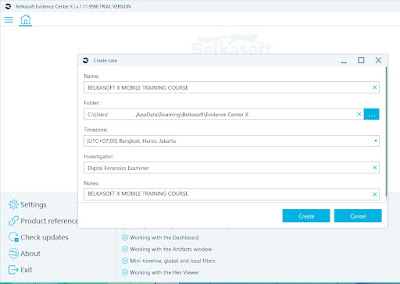
Belkasoft offers a free self-paced course Mobile Forensics with Belkasoft X.

We know how expensive your time is and how difficult it is to plan things now. This is why we prepared a course you get to study in a safe, comfortable environment and at times that are convenient for you. This course can be accessed online anytime until March 31, 2022.

free mobile training course

free mobile training course

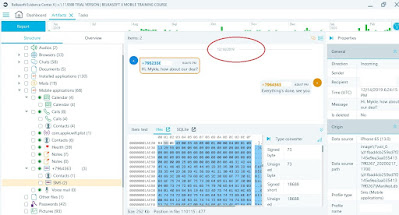
To participate in the training, please do the following:1) If you do not have a Belkasoft Evidence Center X license yet, request a trial at https://belkasoft.com/trialPut “Mobile Self-Paced Course” in the Comment field2) Download and install Belkasoft Evidence Center X3) Complete the training using the form at https://belkasoft.com/

Watch a short tutorial video on how to work with found artifacts


Add a data source (iPhone backup) Download an archive file at https://1drv.ms/u/s!AjgdL3UhWro9iDaYf4j9ba1thYPf?e=c9LjlD

free mobile training course


free mobile training course
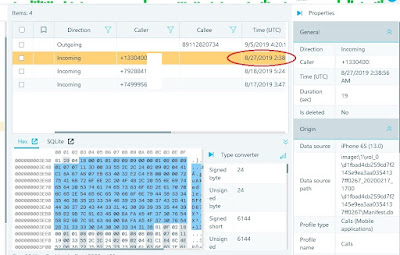
When did the device owner receive the last call from +133040(UTC)?
free mobile training course
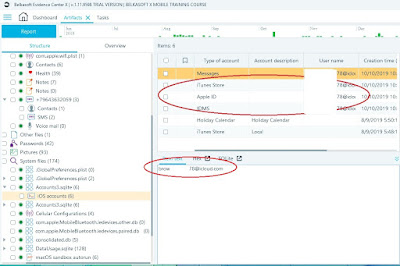
What email is linked to the device owner account (Apple ID)?
free mobile training course
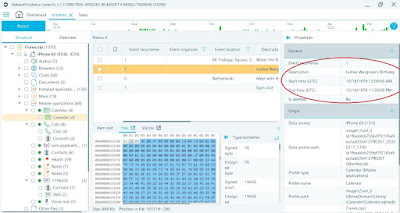
What is the birth date of Wargrave?
free mobile training course
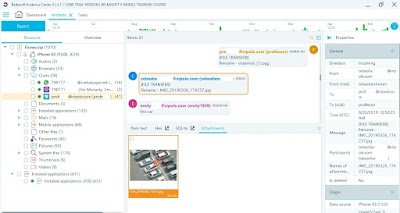
You suppose that “cebastianmoran” sent some materials to “profeccor”in Vipole app, pointing at a car, and you need to find more details. What isthe color of the car?
free mobile training course
You need to learn more about any conversations iPhone ownerparticipated in in the period from December 13, 2019 to December 15, 2019.What kind of conversation could you see?
free mobile training course

Webinar on locked iPhones acquisition

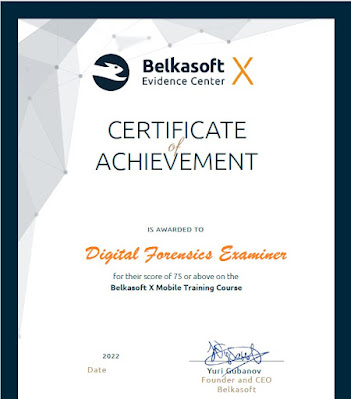
CERTIFICATE ACHIEVEMENT OF  BELKASOFT X MOBILE TRAINING COURSE

free mobile training course


ที่มา: belkasoft.com


หมายเหตุ:เนื้อหาในเว็บไซต์นี้มีขึ้นเพื่อวัตถุประสงค์ในการให้ข้อมูลและเพื่อการศึกษาเท่านั้น

* หากมีข้อมูลข้อผิดพลาดประการใด ขออภัยมา ณ ที่นี้ด้วย  รบกวนแจ้ง Admin เพื่อแก้ไขต่อไป
ขอบคุณครับ

#WindowsForensic #ComputerForensics #dfir #forensics #digitalforensics #computerforensic #investigation #cybercrime #fraud 


Volatility Lab

Volatility Lab  Image Wanna.vmem P.73 windows.info #python3  vol.py   -f '/home/kali/Desktop/Wanna/Wanna-MEM.vmem' windows.info     ...