DIGITAL FORENSICS:File Hash Check with VirusTotal
How to install Didier Stevens “virustotal-search.py” script
วันนี่มาตรวจสอบ malware โดยไฟล์แฮช (malware hash list) จำนวนมากด้วย VirusTotal คุณจะต้องใช้คีย์ VirusTotal API มีเครื่องมือมากมาย แต่ถ้าคุณต้องการใช้เครื่องมือที่จะนำเข้าคีย์ API จากบัญชีของคุณ ตรวจสอบให้แน่ใจว่าเครื่องมือนี้ได้ Didier Stevens “virustotal-search.py” script
1. Download latest version of Python 3
2. Install it – check usage for PATH environment variable and for easier future updates install to the root of your C: drive. Example for Python 3.10:
C:\Python310\
และ Download virustotal-search.py
3. Navigate to Didier Stevens virustotal-search.py Github page
4. On top of the page Right Click the [Raw] button and [Save link as]. Save the file in the place that you will find it later, for example:
C:\tools\virustotal-search\virustotal-search.py
5. Sign up for VirusTotal for free.
6. After you login to VT, click your profile button, then [API Key]. Copy this API key so you can use it later, maybe save to text file.
* Free VirusTotal Public API key can be used for 4 hash requests per minute and 500 hashes per day. Same goes for the script itself, it will not send more than 4 requests per minute. It was scripted that way and if you have a premium account with bigger quota, the script will still send 4 requests per minute. Keep that in mind. After your reach your daily quota of 500 requests with free account – VT will send you an email and the script will fail to send new requests until the next day.
How to use Didier Stevens “virustotal-search.py” script to bulk file hash check with VirusTotal
* This guide is for virustotal-search.py script version 1.1.6 and above, which uses python 3. If you want to use older versions for python 2 you will need also to install “poster” package with command: pip install poster.
ทำการเตรียม Hash list ที่เราเตรียมไว้ หรือท่านสามารถเอาตัวอย่างจาก virusshare
1. Save all your file hashes to text file, example path:
C:\tools\virustotal-search\VirusShare.txt
2. Command line usage example:
virustotal-search.py List.txt -k <YourAPIKey> -s , -o Output.csv
Example with full paths from above:
"C:\tools\virustotal-search\virustotal-search.py" "C:\tools\virustotal-search\VirusShare.txt" -k <YourAPIKey> -s , -o "C:\tools\virustotal-search\Output.csv"
Command line Example if you did not select PATH variable usage and need to specify path to “python.exe”:
"C:\Python39\python.exe" "C:\tools\virustotal-search\virustotal-search.py" "C:\tools\virustotal-search\VirusShare.txt" -k <YourAPIKey> -s , -o "C:\tools\virustotal-search\Output.csv"
virustotal-search switches explanation
List.txt: The second argument for the script. Is any text file that holds the hash list.
-k: API key.
-s ,: Separator character between the columns. “,” (comma) is the character that is used in this case for regular CSV (comma separated values) document. The default setting without the “-s” switch is “;” (semicolon).
-o: Output csv file.
For help and more settings / switches you can use the -h switch.
virusshare lists of MD5 hashes
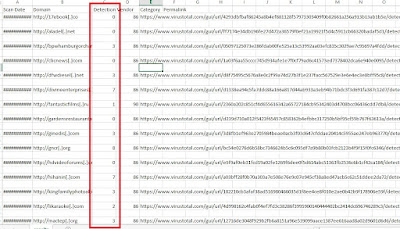
Output csv file.
- ท่านสามารถ scan virus หลายไฟล์พร้อมกัน โดยการสร้างค่า hash list ไป scan โดยใช้ เครื่องมือจาก Virustotal ได้
Reference
Bulk File Hash Check with VirusTotal – Didier Stevens script
หมายเหตุ:เนื้อหาในเว็บไซต์นี้มีขึ้นเพื่อวัตถุประสงค์ในการให้ข้อมูลและเพื่อการศึกษาเท่านั้น
* หากมีข้อมูลข้อผิดพลาดประการใด ขออภัยมา ณ ที่นี้ด้วย รบกวนแจ้ง Admin เพื่อแก้ไขต่อไป
ขอบคุณครับ
#WindowsForensic #computerforensic #ComputerForensics #dfir #forensics
#digitalforensics #investigation #cybercrime #fraud