Thursday, February 22, 2024

รอบรู้เรื่อง Digital Forensic พร้อมการรับมือกับ Advanced Threat และ Social Media

รอบรู้เรื่อง Digital Forensic พร้อมการรับมือกับ Advanced Threat และ Social Media

รอบรู้เรื่อง Digital Forensic พร้อมการรับมือกับ Advanced Threat และ Social Media
พร้อมเรียนรู้กลยุทธ์สำคัญที่จะช่วยให้แกะรอยอาชญากรรมเหล่านี้ได้ ผ่านการสืบค้นหลักฐานทางดิจิทัล (Digital Forensic) จากกรณีตัวอย่าง!!

Digital Forensic พร้อมการรับมือกับ Advanced Threat และ Social Media

Computer Forensics

     คือการเก็บหลักฐาน,การค้นหา,วิเคราะห์และการนำเสนอหลักฐานทางดิจิทัลที่อยู่ในอุปกรณ์คอมพิวเตอร์และอิเล็กทรอนิกส์เช่นไฟล์ที่อยู่ในคอมพิวเตอร์,อุปกรณ์อิเล็กทรอนิกส์,โทรศัพท์มือถือรวมถึงหลักฐานดิจิทัลที่ถูกสร้างจากระบบคอมพิวเตอร์เป็นต้น ด้วยกระบวนการที่น่าเชื่อถือเพื่อให้สามารถนำข้อเท็จจริงจากการวิเคราะห์หลักฐานนาไปใช้เป็นหลักฐานที่ศาลยอมรับฟังได้ โดยหน่วยงาน หรือองค์กรที่เกี่ยวข้อง และมีอำนาจหน้าที่ตามกฎหมาย ซึ่งข้อมูลเหล่านี้สามารถนาไปใช้ระบุผู้กระทำผิดจนถึงเป็นหลักฐานในการดำเนินคดีได้

Digital Forensic พร้อมการรับมือกับ Advanced Threat

  • Problems & Challenge
รอบรู้เรื่อง Digital Forensic พร้อมการรับมือกับ Advanced Threat และ Social Media

  • กระบวนการจัดการพยานหลักฐาน

  • ระบุ
รอบรู้เรื่อง Digital Forensic พร้อมการรับมือกับ Advanced Threat และ Social Media

1. ระบุ 

1 ฐานความผิด - องค์ประกอบความผิด
2 ข้อสันนิษฐาน
3 อุปกรณ์คอมพิวเตอร์ที่เกี่ยวข้อง
4 ข้อมูลคอมพิวเตอร์ที่เกี่ยวข้อง
5 ประเภทความสัมพันธ์
     - ทางตรง
     - ทางอ้อม เช่น แรงจูงใจ, ความสัมพันธ์, ประโยชน์

  • การพิสูจน์ตัวตน
รอบรู้เรื่อง Digital Forensic พร้อมการรับมือกับ Advanced Threat และ Social Media


1. สิ่งที่คุณมี Something you have
2. สิ่งที่คุณรู้ Something you know
3. สิ่งที่คุณเป็น Something you are
  • กระบวนการจัดการพยานหลักฐาน
รอบรู้เรื่อง Digital Forensic พร้อมการรับมือกับ Advanced Threat และ Social Media
2. รักษา
1. อำนาจหน้าที่บุคคลที่จะเข้าถึง
2. ห่วงโซ่พยานหลักฐาน
3. ป้องกันการเปลี่ยนแปลง
     - การเข้าถึงทางเครือข่าย
     - ประเภทข้อมูลคอมพิวเตอร์ (Volatile Data)
     - ชนิดสื่อบันทึกข้อมูล/อุปกรณ์
     - สถานการณ์ เช่น ข้อมูลกำลังถูกลบ
  • จัดเก็บ
รอบรู้เรื่อง Digital Forensic พร้อมการรับมือกับ Advanced Threat และ Social Media
3. จัดเก็บ
1.ทักษะ / ความรู้
2. เครื่องมือ / อุปกรณ์
3. วิธีกการปฏิบัติ
     - ประเภทอุปกรณ์ / ระบบปฏิบัติการ
     - อื่น ๆ เช่น การเก็บภาพที่กำลัง Live สด, FB post
4. การบรรจุหีบห่อ
รอบรู้เรื่อง Digital Forensic พร้อมการรับมือกับ Advanced Threat และ Social Media

  • พยานหลักฐานที่บุคคลภายนอก
รอบรู้เรื่อง Digital Forensic พร้อมการรับมือกับ Advanced Threat และ Social Media


รอบรู้เรื่อง Digital Forensic พร้อมการรับมือกับ Advanced Threat และ Social Media

  • วิเคราะห์
4. วิเคราะห์
1. ตั้งประเด็นการตรวจพิสูจน์ตามรูปคดี
2. กระบวนการตรวจ
     - เครื่องมือ
     - วิธีการ / หลักวิชาการ
3. ออกรายงาน
     - ข้อเท็จจริง
     - ความเห็น
รอบรู้เรื่อง Digital Forensic พร้อมการรับมือกับ Advanced Threat และ Social Media

รอบรู้เรื่อง Digital Forensic พร้อมการรับมือกับ Advanced Threat และ Social Media
  • หลักการรักษาความน่าเชื่อถือ
รอบรู้เรื่อง Digital Forensic พร้อมการรับมือกับ Advanced Threat และ Social Media

รอบรู้เรื่อง Digital Forensic พร้อมการรับมือกับ Advanced Threat และ Social Media

รอบรู้เรื่อง Digital Forensic พร้อมการรับมือกับ Advanced Threat และ Social Media

รอบรู้เรื่อง Digital Forensic พร้อมการรับมือกับ Advanced Threat และ Social Media
“ข้อมูลคอมพิวเตอร์” หมายความว่า ข้อมูล ข้อความ คำสั่ง ชุดคำสั่ง หรือสิ่งอื่นใดบรรดาที่อยู่ในระบบคอมพิวเตอร์ในสภาพที่ระบบคอมพิวเตอร์อาจประมวลผลได้ และให้หมายความรวมถึงข้อมูลอิเล็กทรอนิกส์ตามกฎหมายว่าด้วยธุรกรรมทางอิเล็กทรอนิกส์ด้วย (พ.ร.บ.ว่าด้วยการกระทำความผิดเกี่ยวกับคอมพิวเตอร์ฯ ม.3)
รอบรู้เรื่อง Digital Forensic พร้อมการรับมือกับ Advanced Threat และ Social Media

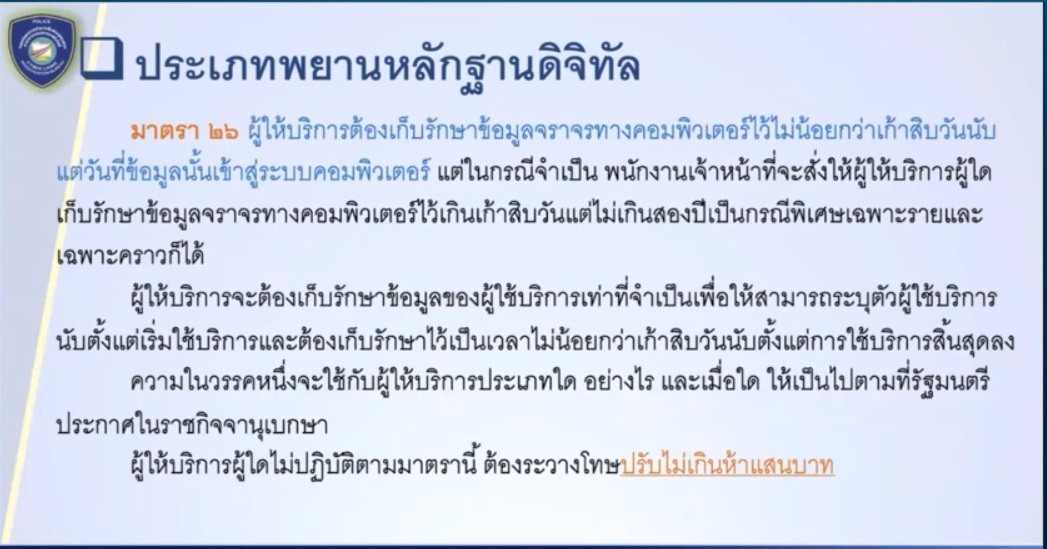
  • ประเภทพยานหลักฐานดิจิทัล
รอบรู้เรื่อง Digital Forensic พร้อมการรับมือกับ Advanced Threat และ Social Media

  • แบ่งตามสื่อบันทึกข้อมูล
รอบรู้เรื่อง Digital Forensic พร้อมการรับมือกับ Advanced Threat และ Social Media

  • แบ่งตามการะบวนการสื่่อสาร
รอบรู้เรื่อง Digital Forensic พร้อมการรับมือกับ Advanced Threat และ Social Media

รอบรู้เรื่อง Digital Forensic พร้อมการรับมือกับ Advanced Threat และ Social Media

  • แบ่งตามการเข้ารหัส
รอบรู้เรื่อง Digital Forensic พร้อมการรับมือกับ Advanced Threat และ Social Media

  • แบ่งตามชนิดอุปกรณ์
รอบรู้เรื่อง Digital Forensic พร้อมการรับมือกับ Advanced Threat และ Social Media

  • กระบวนการเกิดพยานหลักฐาน
รอบรู้เรื่อง Digital Forensic พร้อมการรับมือกับ Advanced Threat และ Social Media

  • การปฎิบัติงาน
รอบรู้เรื่อง Digital Forensic พร้อมการรับมือกับ Advanced Threat และ Social Media

รอบรู้เรื่อง Digital Forensic พร้อมการรับมือกับ Advanced Threat และ Social Media

รอบรู้เรื่อง Digital Forensic พร้อมการรับมือกับ Advanced Threat และ Social Media

รอบรู้เรื่อง Digital Forensic พร้อมการรับมือกับ Advanced Threat และ Social Media

รอบรู้เรื่อง Digital Forensic พร้อมการรับมือกับ Advanced Threat และ Social Media

  • ขั้นตอนการปฎิบัติงานที่เกี่ยวข้องกับการตรวจพิสูจน์
รอบรู้เรื่อง Digital Forensic พร้อมการรับมือกับ Advanced Threat และ Social Media

ขั้นตอนการปฏิบัติงานที่เกี่ยวข้องกับการตรวจพิสูจน์

1. รับอุปกรณ์/วัตถุพยานหลักฐานที่ต้องการตรวจพิสูจน์ พร้อมหนังสือนำส่งจากหน่วยงาน/ถ่ายภาพก่อนแกะวัตถุพยานหลักฐาน
2. ถ่ายภาพทั้งด้านหน้าและด้านหลังอุปกรณ์/วัตถุพยานหลักฐาน
3. บันทึกลงในระบบตรวจพิสูจน์หลักฐาน
4. ส่งเจ้าหน้าที่ห้องตรวจพิสูจน์หลักฐาน (Forensic) เพื่อตรวจและจัดเก็บรอดำเนินการ
5. พิจารณาว่าอุปกรณ์/วัตถุพยานหลักฐาน เป็นแบบใด และเลือกอุปกรณ์ให้ถูกต้อง
6. เมื่อตรวจพิสูจน์เรียบร้อย จัดทำรายงานผล
7. ประหน่วยงานเจ้าของเรื่องรับผลตรวจและรับของกลางคืน
8. คืนของกลางและผลตรวจให้กับหน่วยงานเจ้าของเรื่องตรวจสอบอุปกรณ์/วัตถุพยานหลักฐานให้ตรงกับที่นำส่ง เซ็นรับผลตรวจและของกลางพร้อมสำเนาบัตรเจ้าหน้าที่ที่มารับคืน

รอบรู้เรื่อง Digital Forensic พร้อมการรับมือกับ Advanced Threat และ Social Media

รอบรู้เรื่อง Digital Forensic พร้อมการรับมือกับ Advanced Threat และ Social Media

มาตรฐานของเครื่องมือที่ใช้ในการตรวจพิสูจน์พยานหลักฐานอิเล็กทรอนิกส์

1. กำหนดได้ (Definable)
กระบวนการตรวจพิสูจน์พยานหลักฐานใดๆ จะต้องกำหนดผลลัพธ์จากวัตถุประสงค์ที่ต้องการได้ เพื่ออธิบายกระบวนการ และรับรองความถูกต้องของกระบวนการ

รอบรู้เรื่อง Digital Forensic พร้อมการรับมือกับ Advanced Threat และ Social Media


2.คาดการณ์ได้ (Predictable) เครื่องมือจะต้องสามารถคาดการณ์ได้ หากเครื่องมือไม่สามารถให้ผลลัพธ์ที่คาดการณ์ได้ก็เท่ากับว่าขาดความสมบูรณ์ ตามหลักการตรวจพิสูจน์พยานหลักฐานและไม่สามารถนำมาใช้งานได้

รอบรู้เรื่อง Digital Forensic พร้อมการรับมือกับ Advanced Threat และ Social Media


3. ทำซ้ำได้ (Repeatable)
การทำงานจะต้องทำซ้ำได้ภายในขอบเขดความผิดพลาดที่เป็นที่ยอมรับ

รอบรู้เรื่อง Digital Forensic พร้อมการรับมือกับ Advanced Threat และ Social Media

4. ตรวจสอบได้ (Verifiable)
หนึ่งในหลักเกณฑ์ที่สาคัญที่สุดสาหรับเครื่องมือ ในการตรวจพิสูจน์พยานหลักฐานคือความสามารถในการตรวจสอบผลลัพธ์ที่ได้จากเครื่องมือ ไม่เพียงแต่ภายในสภาพแวดล้อมเฉพาะของการทดสอบเท่านั้น แต่ยังรวมถึงเครื่องมืออื่นๆ ในประเภทเดียวกัน ตัวอย่างเช่น ถ้าผู้ตรวจสอบคนหนึ่งในคดีใช้ซอฟต์แวร์การตรวจพิสูจน์พยานหลักฐานแบบ EnCase และผู้ตรวจสอบอีกคนหนึ่งใช้ชุดเครื่องมือซอฟต์แวร์การตรวจพิสูจน์พยานหลักฐานแบบ Forensic Tool Kit พวกเขาทั้งสองจะพบผลลัพธ์เดียวกัน

รอบรู้เรื่อง Digital Forensic พร้อมการรับมือกับ Advanced Threat และ Social Media


รอบรู้เรื่อง Digital Forensic พร้อมการรับมือกับ Advanced Threat และ Social Media

รอบรู้เรื่อง Digital Forensic พร้อมการรับมือกับ Advanced Threat และ Social Media

  • การวิเคราะห์พยานหลักฐาน
รอบรู้เรื่อง Digital Forensic พร้อมการรับมือกับ Advanced Threat และ Social Media

รอบรู้เรื่อง Digital Forensic พร้อมการรับมือกับ Advanced Threat และ Social Media

รอบรู้เรื่อง Digital Forensic พร้อมการรับมือกับ Advanced Threat และ Social Media

รอบรู้เรื่อง Digital Forensic พร้อมการรับมือกับ Advanced Threat และ Social Media

  • รายละเอียดของพยานหลักฐาน
รอบรู้เรื่อง Digital Forensic พร้อมการรับมือกับ Advanced Threat และ Social Media

  • การตั้งประเด็นคำถามการจตรวจพิสูจน์
รอบรู้เรื่อง Digital Forensic พร้อมการรับมือกับ Advanced Threat และ Social Media

รอบรู้เรื่อง Digital Forensic พร้อมการรับมือกับ Advanced Threat และ Social Media

  • ประเภทของประเด็นคำถาม
รอบรู้เรื่อง Digital Forensic พร้อมการรับมือกับ Advanced Threat และ Social Media

  • การตอบประเด็นคำถามของผู้ตรวจพิสูจน์
รอบรู้เรื่อง Digital Forensic พร้อมการรับมือกับ Advanced Threat และ Social Media


รอบรู้เรื่อง Digital Forensic พร้อมการรับมือกับ Advanced Threat และ Social Media


รอบรู้เรื่อง Digital Forensic พร้อมการรับมือกับ Advanced Threat และ Social Media


อ่านเพิ่มเติม:


Reference Thailand National Cyber Academy (THNCA) by NCSA

รอบรู้เรื่อง Digital Forensic พร้อมการรับมือกับ Advanced Threat และ Social Media

ข้อมูลจาก การอบรม NCSA Cybersecurity Knowledge Sharing ครั้งที่ 4/2567 หัวข้อ รอบรู้เรื่อง Digital Forensic พร้อมการรับมือกับ Advanced Threat และ Social Media โดย สำนักวิชาการความมั่นคงปลอดภัยไซเบอร์แห่งชาติ สกมช. ร่วมกับวิทยากรผู้เชี่ยวชาญจาก กองบัญชาการตำรวจสืบสวนสอบสวนอาชญากรรมทางเทคโนโลยี

ขอขอบคุณวิทยากร ท่าน พ.ต.ต วีระพงษ์ แนวคำดี  สว. กลุ่มงานป้องกันอาชญากรรมทางเทคโนโลยี ท่ี่ได้นำความรู้และประสบการณ์มาให้ความรู้ในงานนี้ด้วยครับ และขอนำข้อมูลมาเผยแพร่เพื่อประโยชน์ต่อไป


หมายเหตุ:เนื้อหาในเว็บไซต์นี้มีขึ้นเพื่อวัตถุประสงค์ในการให้ข้อมูลและเพื่อการศึกษาเท่านั้น ช่วยเตือนความจำ

* หากมีข้อมูลข้อผิดพลาดประการใด ขออภัยมา ณ ที่นี้ด้วย  รบกวนแจ้ง Admin เพื่อแก้ไขต่อไป
ขอบคุณครับ


#WINDOWSFORENSIC #COMPUTERFORENSICS #DFIR #FORENSICS #DIGITALFORENSICS #COMPUTERFORENSIC #INVESTIGATION #CYBERCRIME #FRAUD 

Friday, February 9, 2024

Digital Forensics:How to View and Remove Metadata from Images?

Digital Forensics:How to View and Remove Metadata from Images?

What is Metadata ?

Metadata refers to data that provides information about other data. In other words, it's data about data. Metadata describes various aspects of the primary data, such as its content, context, structure, and other attributes. It serves to provide additional context, facilitate organization, and enhance the understanding and usability of the primary data.

Examples of metadata include:

  1. File Metadata: Information about a file, such as its name, size, type, creation date, and last modified date.
  2. Document Metadata: Information about a document, such as its author, title, subject, keywords, and language.
  3. Image Metadata: Information embedded within an image file, such as the camera settings used to capture the image, location coordinates (if available), and creation date.
  4. Web Page Metadata: Information embedded within a web page's HTML code, such as the page title, description, keywords, and author.
  5. Database Metadata: Information about the structure and contents of a database, such as table names, column names, data types, and relationships between tables.

Digital Forensics:How to View and Remove Metadata from Images
Photo Credit by : ianaré sévi

Whit is EXIF data ?

EXIF (Exchangeable Image File Format) data is a type of metadata that is commonly associated with image files, particularly those captured by digital cameras and smartphones. EXIF data contains a variety of information about the image and how it was captured. Some common types of information found in EXIF data include:

  1. Camera Settings: This includes details such as the make and model of the camera or smartphone, the lens type, focal length, aperture, shutter speed, and ISO settings used to capture the image.

  2. Date and Time: The date and time when the image was captured.

  3. Geolocation: GPS coordinates indicating the location where the image was captured, if the device supports geotagging.

  4. Orientation: Information about the orientation of the camera when the image was taken (e.g., portrait or landscape).

  5. Camera Manufacturer Information: Details about the manufacturer of the camera or smartphone, such as the camera's serial number.

  6. Copyright Information: Copyright information entered by the photographer, including their name, contact details, and copyright status.


Digital Forensics:How to View and Remove Metadata from Images
Photo Credit by opanda

Image Description = Door to the Soul
Make = Nikon
Model = Nikon F5
Software = Opanda PowerExif
Artist = Kenneth Garrett
Copyright = Kenneth Garrett

Why Should You Remove Metadata?

There are several reasons why you might want to remove metadata from files:

  1. Privacy Concerns: Metadata can contain sensitive information that you may not want to share publicly, such as your location, author name, or comments. Removing metadata helps protect your privacy and prevents inadvertent disclosure of personal or confidential information.

  2. Security Risks: Metadata can potentially reveal information that could be exploited by malicious actors. For example, geolocation metadata in photos could disclose your whereabouts, posing a security risk if shared unintentionally. Removing metadata reduces the risk of exposing sensitive information to unauthorized individuals.

  3. Reducing File Size: Metadata can add to the size of files, especially in documents or images with extensive metadata fields. Removing metadata can help reduce file size, making it easier to store, share, or transmit files, particularly in environments with limited bandwidth or storage capacity.

  4. Protecting Intellectual Property: Metadata often includes information about the creator or owner of a file. Removing metadata can help protect the intellectual property rights of the content creator by preventing unauthorized use or attribution.

  5. Enhancing Anonymity: In certain contexts, such as whistleblowing or journalistic activities, removing metadata from files can help maintain the anonymity of sources or contributors, protecting them from potential retaliation or identification.


Analyzing EXIF data:

The ways to analyze the metadata in a photo is through a free application Exiftool. 
Let's take a look at File A's metadata with exiftool:

Digital Forensics:How to View and Remove Metadata from Images
Exiftool on Windows
Digital Forensics:How to View and Remove Metadata from Images
GPS Latitude/Longitude

#H:\exiftool-12.76>"exiftool(-k).exe" "C:\Users\...\Downloads\DSCN0042.jpg"

ExifTool is a platform-independent Perl library plus a command-line application for reading, writing and editing meta information

From the snapshot, we can gather the following useful information:

1. File Size: 157 KB
2. File Creation Date: 2008:10:22 17:00:07
3. File Type: JPG
4. File Name: DSCN0042.jpg
5.GPS Date/Time                   : 2008:10:23 14:57:41.37Z
6.GPS Latitude                       :  43 deg 27' 52.04" N
7.GPS Longitude                   : 1 11 deg 52' 53.32" E
8.Make                                   : NIKON
9.Camera Model Name          : COOLPIX P6000

How to Remove Metadata in Images?

#exiftool(-k).exe -all=

Digital Forensics:How to View and Remove Metadata from Images

How to View   Metadata in Images?

#H:\exiftool-12.76>"exiftool(-k).exe" "C:\Users\...\Downloads\DSCN0042.jpg"

Digital Forensics:How to View and Remove Metadata from Images


Reference:

https://eforensicsmag.com/download/metadata-analysis-tools-and-techniques/
https://en.wikipedia.org/wiki/Metadata


* หากมีข้อมูลข้อผิดพลาดประการใด ขออภัยมา ณ ที่นี้ด้วย  รบกวนแจ้ง Admin เพื่อแก้ไขต่อไป
ขอบคุณครับ

#WindowsForensic #computerforensic #ComputerForensics #dfir #forensics
#digitalforensics #investigation #cybercrime #fraud

Digital Forensics:SRUDB.dat

Digital Forensics:SRUDB.dat


System Resource Utilization Monitor (SRUM) was introduced in Windows 8 and Windows Server 2019 and was designed to track the utilization of various system resources such as CPU usage, network activity, and even battery consumption. Some of the details collected as part of SRUM can be viewed in the App History tab within Task Manager, but there is much more information not displayed in the GUI

  • SRUM data is stored in a Windows ESE database located in the following file: %SYSTEMROOT%\System32\ sru\SRUDB.dat
  • SRUM is only available on Windows 8 and later and Windows Server 2019 and later

Digital Forensics:SRUDB.dat
Figure  Output of running Autopsy against the Run Programs > Data Artifacts  

SRUM tracks key information regarding application execution such as the name and path of every executed application on the system and the SID of the identity that executed the application, even if the application has since been deleted

SRUM, or System Resource Utilization Monitor, is a feature of modern Windows systems , intended to track the application usage, network utilization and system energy state.

Download Eric Zimmerman's Tools


running SrumECmd  against the location where these files reside:

 SrumECmd version 0.5.1.0

 Author: Eric Zimmerman (saericzimmerman@gmail.com)
 https://github.com/EricZimmerman/Srum

 Examples: SrumECmd.exe -f "C:\Temp\SRUDB.dat" -r "C:\Temp\SOFTWARE" --csv
 "C:\Temp\"
           SrumECmd.exe -f "C:\Temp\SRUDB.dat" --csv "c:\temp"
           SrumECmd.exe -d "C:\Temp" --csv "c:\temp"

           Short options (single letter) are prefixed with a single dash. Long

 commands are prefixed with two dashes


sage:
 SrumECmd [options]

ptions:
 -f <f>                  SRUDB.dat file to parse
 -r <r>                  SOFTWARE hive to process. This is optional, but
                         recommended
 -d <d>                  Directory to recursively process, looking for
                         SRUDB.dat and SOFTWARE hive. This mode is primarily
                         used with KAPE so both SRUDB.dat and SOFTWARE hive
                         can be located
 --csv <csv> (REQUIRED)  Directory to save CSV formatted results to. Be sure
                         to include the full path in double quotes
 --dt <dt>               The custom date/time format to use when displaying
                         time stamps. See https://goo.gl/CNVq0k for options
                          [default: yyyy-MM-dd HH:mm:ss]
 --debug                 Show debug information during processing [default:
                         False]
 --trace                 Show trace information during processing [default:
                         False]
 --version               Show version information
 -?, -h, --help          Show help and usage information

Command 
#C:\Users\...\Downloads\SrumECmd>SrumECmd.exe -f "C:\VM\...\AD01\0001\Exp
ort\srudb.dat" --csv "C:\VM\...\AD01\0001\Export\temp"


Examine output in Timeline Explorer!

System Resource Utilization Monitor artifacts :

  • SRUM Application Resource Usage
  • SRUM Network Connections
  • SRUM Network Usage
  • SRUM Push Notification Data
  • SRUM Energy Usage


Windows artifacts


Refer:  


หมายเหตุ:เนื้อหาในเว็บไซต์นี้มีขึ้นเพื่อวัตถุประสงค์ในการให้ข้อมูลและเพื่อการศึกษาเท่านั้น ช่วยเตือนความจำ

* หากมีข้อมูลข้อผิดพลาดประการใด ขออภัยมา ณ ที่นี้ด้วย  รบกวนแจ้ง Admin เพื่อแก้ไขต่อไป
ขอบคุณครับ

#WINDOWSFORENSIC #COMPUTERFORENSICS #DFIR #FORENSICS #DIGITALFORENSICS #COMPUTERFORENSIC #INVESTIGATION #CYBERCRIME #FRAUD 


Volatility Lab

Volatility Lab  Image Wanna.vmem P.73 windows.info #python3  vol.py   -f '/home/kali/Desktop/Wanna/Wanna-MEM.vmem' windows.info     ...