Monday, September 18, 2017

Digital Forensics:WIPE DoD

Digital Forensics:WIPE DoD

เคยมีกรณีศึกษาที่บริษัทหลายแห่งนำฮาร์ดดิสก์ออกไปขายต่อหรือบริจาค โดยที่ไม่ได้ทำลายข้อมูลหรือแค่สั่งลบด้วยวิธีธรรมดา   ส่งผลให้ยังสามารถกู้ข้อมูลสำคัญที่เป็นความลับกลับคืนมาได้

"มาตรฐาน DoD" หรือ  DoD 5220.22-M เป็นคำที่มักใช้ในอุตสาหกรรมการล้างข้อมูล
photo credit:blancco[.]com


แม้ว่าจะเป็นเทคนิคการเขียนทับที่ จะเขียนข้อมูลเดียวกันทุกที่ มักเป็นเพียงรูปแบบของศูนย์ทั้งหมด หรือ หนึ่งทั้งหมด และ   การเขียนทับแบบสุ่ม   การใช้วิธีการดังกล่าวจะป้องกันไม่ให้ถูกดึงข้อมูล  หรือป้องกันจากซอฟต์แวร์กู้คืนข้อมูล  โปรแกรมลบข้อมูลหลายตัวมักใช้ DoD 5220.22-M เป็นมาตรฐาน

 วิธีการลบข้อมูลแบบ DoD 5220.22-M มักใช้ตามวิธีต่อไปนี้:


Pass 1: Read 0 and verify
Pass 2: Read one and verify
Pass 3: Write a random character and verify
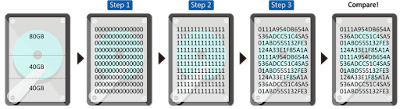

https://www.datadestroyers.nl/technologie/dod_5220.22-m_data_wismethode.html
www.datadestroyers.nl 

DoD 5220.22-M

 รอบที่ 1: เขียนศูนย์ทับข้อมูลทั้งหมด
 รอบที่ 2: เขียนหนึ่งทับข้อมูลทั้งหมด
 รอบที่ 3: เขียนแบบสุ่มทับข้อมูลทั้งหมด


ต่อมามาตรฐาน "DoD 522.22-M" มักถูกแทนที่ด้วยมาตรฐานการล้างข้อมูล (Guidelines for Media Sanitization) อื่น ๆ เช่น   NIST 800 88 Purge
https://en.wikipedia.org/wiki/Data_erasure

DoD 5220.22-M วิธีการในการลบข้อมูลฮาร์ดดิสก์ โดยการเขียนทับหลายครั้ง เขียนทับมักอาจจะไม่เพียงพอ จำเป็นต้องมี การย่อยสลายและ หรือการทำลายทางกายภาพ (degauss)  ควบคู่กันไป


ในช่วงไม่กี่ปีที่ผ่านมา NIST (สถาบันมาตรฐานและเทคโนโลยีแห่งชาติ) เผยแพร่พิเศษของ NIST Special Publication 800-88  ตีพิมพ์โดยมีเจตนาที่จะให้ แนวทางปฎิบัติการลบข้อมูลสื่ออิเล็กทรอนิกส์ ของสหรัฐอเมริกา  เอกสารฉบับนี้ระบุถึงวิธีการที่เหมาะสมสำหรับการล้างข้อมูลในฮาร์ดไดรฟ์และสื่ออื่น ๆ ภายใต้ข้อแนะนำในการทำ (Sanitization)การทำลายข้อมูลเพื่อไม่ให้สามารถกู้กลับคืนมาได้

Guidelines for Media Sanitization
NIST Special Publication 800-88  download


วิธีที่ดีที่สุดเพื่อให้แน่ใจว่าข้อมูลจะถูกกำจัดออกไปเพื่อความปลอดภัยสูงสุดคือ การทำลายทางกายภาพ ด้วยวิธีนี้เราจะไม่สามารถกู้คืนข้อมูลจากเศษใด ๆ


แปะไว้ก่อน Is Full Disk Encryption The Strongest Defense Against Attack?

Digital Forensics:WIPE DoD

อ้างอิง
http://www.dss.mil/documents/odaa/nispom2006-5220.pdf
http://www.datasanitization.org/ 
https://www.thaicert.or.th/newsbite/2017-08-09-02.html
https://www.blancco.com/blog-dod-5220-22-m-wiping-standard-method/
https://www.datadestroyers.nl/technologie/dod_5220.22-m_data_wismethode.html
http://www.diskwipe.org/
https://en.wikipedia.org/wiki/Data_erasure

#wipe
#Sanitization
#Digital Forensics Certification

หมายเหตุ:เนื้อหาในเว็บไซต์นี้มีขึ้นเพื่อวัตถุประสงค์ในการให้ข้อมูลและเพื่อการศึกษาเท่านั้น

* หากมีข้อมูลข้อผิดพลาดประการใด ขออภัยมา ณ ที่นี้ด้วย  รบกวนแจ้ง Admin เพื่อแก้ไขต่อไป
ขอบคุณครับ

#WindowsForensic #ComputerForensics #dfir #forensics #digitalforensics #computerforensic #investigation #cybercrime #fraud

Sunday, September 17, 2017

Digital Forensics: USB Forensics Part II

Digital Forensics: USB Forensics >  Part II

USB Detective


Description
USB Detective is an application for identifying, investigating, and reporting on USB storage devices that have been connected to a Windows system.  Using its consistency level color-coding, USB Detective gives you the ability to quickly distinguish attributes with corroborating data sources from those with potentially misleading or inaccurate timestamps.  USB Detective’s findings are organized to allow for a high-level view of USB device activity using the results grid as well as a more in-depth examination using the verbose view.

 Website: https://usbdetective.com/
..............................................................................

USBDeview


Description
USBDeview is a small utility that lists all USB devices that currently connected to your computer, as well as all USB devices that you previously used.
For each USB device, extended information is displayed: Device name/description, device type, serial number (for mass storage devices), the date/time that device was added, VendorID, ProductID, and more...
USBDeview also allows you to uninstall USB devices that you previously used, disconnect USB devices that are currently connected to your computer, as well as to disable and enable USB devices.
You can also use USBDeview on a remote computer, as long as you login to that computer with admin user. Download.

 Website: https://www.nirsoft.net/utils/usb_devices_view.html
..............................................................................


Windows USB Storage Parser (usp)


Introduction
usp is a command line tool that can be scripted to work with other tools. It automates various manual techniques for extracting and analyzing different registry entries and Windows log files, to pull together a report that documents the USB activity on a Windows computer. The report displays a summary of the USB device, timestamps of when the device was initially plugged, last time the device was plugged in, and various other metadata.

There are 5 use-cases that the Windows version of usp handles. It can process USB artifacts from: (a) a live Windows system, ranging from Windows XP up to Windows 2008, (b) an image of a Windows hard drive, (c) extracted registry hives and setupapi logs, (c) an external drive that was mounted and (d) a monolithic VMWare virtual disk file.


Website: https://tzworks.net/prototype_page.php?proto_id=13
..............................................................................

USB Forensic Tracker (USBFT)


Introduction
USB Forensic Tracker (USBFT) is a comprehensive forensic tool that extracts USB device connection artefacts from a range of locations within the live system, from mounted forensic images, from volume shadow copies, from extracted Windows system files and from both extracted Mac OSX and Linux system files. The extracted information from each location is displayed within its own table view. The information can be exported to an Excel file.  Download


website : www.orionforensics.com
..............................................................................


USB Historian


Parse USB Connection History
The Microsoft Windows operating systems records artifacts when USB removable storage devices (thumb drives, iPods, digital cameras, external HDD, etc.) are connected. These artifacts can be found in Plug and Play (PnP) log files as well as the Windows Registry.
For a forensic investigator dealing with the theft, movement, or access to data, these artifacts can play a critical role in an investigation. Download.

website : www.4discovery.com/our-tools

 ..............................................................................

USBDeviceForensics

Info
usbdeviceforensics is a python script to extract numerous bits of information regarding USB devices. It initially used the information from a SANS blog (Rob Lee) post to retrieve operating system specific information. It now has the ability to process multiple NTUSER.dat registry hives in one go.

website : http://www.woanware.co.uk/forensics/usbdeviceforensics.html

 ..............................................................................

sysinsider usbtracker


USBTracker is a quick & dirty coded incident response and forensics Python script to dump USB related information and artifacts from a Windows OS (vista and later).

website : https://github.com/sysinsider/usbtracker

 ..............................................................................


USBDeviceHistory1.0.1
This module scrapes a series of registry keys for information about USB devices that have been inserted into the computer. In addition, the System EventLog is queried for EventIDs 20003 and 20001.


Website : https://www.powershellgallery.com/packages/USBDeviceHistory/1.0.1

Digital Forensics: USB Forensics Part I

หมายเหตุ:เนื้อหาในเว็บไซต์นี้มีขึ้นเพื่อวัตถุประสงค์ในการให้ข้อมูลและเพื่อการศึกษาเท่านั้น

* หากมีข้อมูลข้อผิดพลาดประการใด ขออภัยมา ณ ที่นี้ด้วย  รบกวนแจ้ง Admin เพื่อแก้ไขต่อไป
ขอบคุณครับ

#WindowsForensic #ComputerForensics #dfir #forensics #digitalforensics #computerforensic #investigation #cybercrime #fraud
#USB Forensics

Friday, September 15, 2017

Digital Forensics:แนวทางการสืบสวนสอบและรวบรวมพยานหลักฐานการฉ้อโกงประชาชน

Digital Forensics:แนวทางการสืบสวนสอบและรวบรวมพยานหลักฐานการฉ้อโกงประชาชน


การสืบสวนความผิดที่เกี่ยวกับการกู้ยืมเงินที่เป็นการฉ้อโกงประชาชน
องค์ประกอบความผิด มาตรา 4

กระบวนการสืบสวนคดีกู้ยืมเงินที่เป็นการฉ้อโกงประชาชน
ตัวอย่างเอกสารประกอบการสอบสวน

คดีตัวอย่าง แชร์เช็ค
เก็งกำไรซื้อขายทองคำ
หลอกลงทุนดิจิทัล


ขอขอบคุณท่าน พ.ต.ท.พงศ์พจน์ ธรรมากุลวิชช์ รอง ผกก.(สอบสวน) กก.5 บก.ปอศ. (แนวทางการสืบสวนสอบสวนและรวบรวมพยานหลักฐาน. ในความผิดตามพระราชกำหนดการกู้ยืมเงินที่เป็นการ. ฉ้อโกงประชาชน พ.ศ. 2527.)


หมายเหตุ:เนื้อหาในเว็บไซต์นี้มีขึ้นเพื่อวัตถุประสงค์ในการให้ข้อมูลและเพื่อการศึกษาเท่านั้น
* หากมีข้อมูลข้อผิดพลาดประการใด ขออภัยมา ณ ที่นี้ด้วย  รบกวนแจ้ง Admin เพื่อแก้ไขต่อไป
ขอบคุณครับ

#WINDOWSFORENSIC #COMPUTERFORENSICS #DFIR #FORENSICS  #พยานหลักฐานดิจิทัล #DIGITALFORENSICS #COMPUTERFORENSIC #INVESTIGATION #CYBERCRIME #FRAUD 


Saturday, September 9, 2017

DIGITAL FORENSICS:Incident Response ICTCS 2017 - Workshops

DIGITAL FORENSICS:Incident Response ICTCS 2017 - Workshops


Digital Forensics and Incident Response (DFIR) Workshop

Abstract
Crime committed on computers or information stored on computers is rapidly increasing, especially when our daily lives have become more reliant on devices and digital information. This "Digital Forensics and Incident Response" workshop will focus on two of the most critical fields in all of information security. It will help participants gain both the theoretical and practical skills required to perform digital forensic investigations and respond to computer incidents, by applying hands-on experience with realworld scenarios. The goal of the workshop is to inspire the interest of participants with diverse backgrounds, spread the awareness of fighting cybercrime, and build a better DFIR community. Keywords: Digital Forensics, DFIR, Incident Response, Investigation
Description
The Digital Forensics and Incident Response Workshop focuses on identifying, investigating, and remeidating computer network exploitation. DFIR1 is a broad field and this workshop will serve as your first step in fighting against cyber crime. In particular, it will show and cover the following:
  • Introduction to Digital Forensics and Incident Response,
  • Trending Research Areas,
  • Disk Imaging, Mounting, and Verification,
  • File Carving and File analysis,
  • Working with Autopsy, Searching and indexing,
  • Analyzing Internet history, Thumbnails and Prefetch Files,
  • Basic Windows Registry Analysis,
  • Generating Reports,
  • Extra: Performing Basic DFIR Triage from Collection to Analysis.
Requirements for the participants
To be able to participate in the hands-on sessions during the workshop you will need a Laptop with your prefered operating system and a virtual machine hypervisor such as Virtualbox2 or VMWare3 installed. You will need to download a Windows VM (preferably 7/8)4 , and the CyLR CDQR Forensics Virtual Machine (CCF-VM)5 . Finally, you will also need to download a number of digital forensic tools. The full list will be announced one week before the workshop.
Provided materials
The material and all the instructions will be publicly available on a dedicated Github repository. The repository will be announced at the workshop. You are invited to contribute, open issues and ask questions there after the workshop. The final materials will be published after the workshop day.
Timetable
9:00-10:00 Introduction to Digital Forensics and Incident Response, Trending Research Areas
10:00-10:30 Data acquisition and Verification
10:30-11:00 Hands-on: Disk Imaging, Mounting, and Hashing
11:00-11:15 Coffee Break
11:15-11:30 File Carving and File Analysis
11:30-12:00 Hands-on: File carving, recovering deleted files, and file Analysis
12:00-13:00 Hands-on: Working with Autopsy, Searching and indexing
13:00-14:00 Lunch
14:00-14:30 Artifacts: Internet history, Thumbnails, Prefetch Files, Basic Windows Registry Analysis
14:30-15:30 Hands-on: Analyzing Windows Forensic Artifacts
15:30-16:30 Extra: DFIR Triage: From Collection to Analysis
16:30-17:00 Conclusions, Closing Remarks, Q&A Session
Outcomes
By the end of this workshop, attendees will:
  1. have good understanding of DFIR aspects and trending research areas,
  2. be able to perform data acquisition and verify data,
  3. know how to apply file carving techniques to recover deleted files and analyze acquired files,
  4. learn the essentials of working with Autopsy, and analyzing different Windows artifacts,
  5. have the ability to perform easy DFIR triage starting from data collection to analysis.
  •  

Incident Response ICTCS 2017 - Workshops 

Download Image


ref:

ICTCS-2017-Incident Response-Workshops


#WindowsForensic #ComputerForensics #dfir #forensics #digitalforensics #computerforensic #investigation #cybercrime #fraud #ฝึกทำLab


หมายเหตุ:เนื้อหาในเว็บไซต์นี้มีขึ้นเพื่อวัตถุประสงค์ในการให้ข้อมูลและเพื่อการศึกษาเท่านั้น
* หากมีข้อมูลข้อผิดพลาดประการใด ขออภัยมา ณ ที่นี้ด้วย  รบกวนแจ้ง Admin เพื่อแก้ไขต่อไป
ขอบคุณครับ

Digital Forensics:Digital Forensics Challenge pivotproject

Digital Forensics:Digital Forensics Challenge pivotproject

วันนี้ลองมาฝึกทำ Lab ของ Digital forensics มีเอกสารโจทย์อธิบาย ให้เข้าใจได้ง่าย เลือกเครื่องมือที่ใช้ เช่น FTK Imager ,exiftool,Wireshark, NetworkMiner,foremost, scalpel ,   RegRipper,  Access Data Registry Viewer  และมีโจทย์วิเคราะห์หาหลักฐานจาก Image
About Pivot
The Pivot project  is a portfolio of interesting, practical, enlightening, and often challenging hands-on exercises for people who are trying to improve their mastery of important cybersecurity skills.


Forensic Image Extraction Beginner

Digital Forensics Challenge -- Beginner


หมายเหตุ : เหมาะสำหรับการฝึกฝน Digital Forensics & Incident Response และทำให้ใช้เครื่องมือต่างๆ ได้คล่อง


หมายเหตุ:เนื้อหาในเว็บไซต์นี้มีขึ้นเพื่อวัตถุประสงค์ในการให้ข้อมูลและเพื่อการศึกษาเท่านั้น

* หากมีข้อมูลข้อผิดพลาดประการใด ขออภัยมา ณ ที่นี้ด้วย  รบกวนแจ้ง Admin เพื่อแก้ไขต่อไป
ขอบคุณครับ


#WindowsForensic #ComputerForensics #dfir #forensics #digitalforensics #computerforensic #investigation #cybercrime #fraud #ฝึกทำLab


DIGITAL FORENSICS:RESET WINDOWS 10 PASSWORD WITH HIREN BOOT CD

DIGITAL FORENSICS:Reset Windows 10 Password with Hiren Boot CD

   วันนี้มีเรื่องเล่า case study  
          1.ให้ทำ Forensic Image จาก notebook ( ทำโดยใช้  TD2 เรียบร้อย)
          2. ให้ทำการ Reset windows 10 password  แล้วส่งมอบ notebook คืน

เราเลยจะมาทำข้อ 2   

สิ่งที่ต้องเตรียม
1. Hiren’s Boot DVD   ISO 
2. Windows to GO on Flash Drive
3. Notebook HP (Evidence)


 Step 1  หลังจากทำสำเนาหลักฐานเรียบร้อยแล้ว  โจทย์ให้เราทำการ reset  Notebook password ก่อนส่งคืน
Notebook HP (Evidence)
Step 2 เมื่อเปิดเครื่อง Notebook มา จะไม่สามารถ login ได้เนื่องจากไม่รู้ Password
 
Step 3 ทำการใช้ Hiren’s Boot DVD   แต่พบปัญหาเครื่องค้างไม่สามารถใช้งานได้

Step 4  ทำการใช้  Windows TO Go  บน Flash Drive  เพื่อแก้ปัญหา
USB Boot Windows To GO

Add caption


 Step 5  ทำการเปิดโปรแกรม NTPWEdit ใน   Hiren’s Boot DVD 


C:\WINDOWS\SYSTEM32\CONFIG\SAM
เพื่อไปที่ path ของ C:\WINDOWS\SYSTEM32\CONFIG\SAM   ใน partition  ของ notebook  และ save  ค่า
Step 6  ในกรณีที่ไม่เจอ disk ในเครื่อง Notebook ให้ทำการ  online disk ใน disk management  แล้วทำ Step 5 อีกครั้ง
Online Disk
 Step 7  Restart notebook และทดลองเข้า  Usertest
UserTest


How to Create a Windows To Go Drive (Windows 10) Step-By-Step

Reset Forgotten Windows 10 password with Hirens Boot CD


https://www.microsoft.com/en-us/software-download/windows10

หมายเหตุ:เนื้อหาในเว็บไซต์นี้มีขึ้นเพื่อวัตถุประสงค์ในการให้ข้อมูลและเพื่อการศึกษาเท่านั้น

* หากมีข้อมูลข้อผิดพลาดประการใด ขออภัยมา ณ ที่นี้ด้วย  รบกวนแจ้ง Admin เพื่อแก้ไขต่อไป
ขอบคุณครับ

#WindowsForensic #ComputerForensics #dfir #forensics #digitalforensics #computerforensic #investigation #cybercrime #fraud


Data Breach Check

Data Breach Check Data Breach Check EP.4 “คิด ก่อน Prompt” AI อาจช่วยคุณทำงานได้เร็วขึ้น แต่บางครั้ง…ข้อมูลสำคัญก็อาจ “หลุดออกไป” โดยไม่รู้...