Thursday, June 11, 2020

Digital Forensics:Seized Forensic data collection

Digital Forensics:Seized Forensic data collection


Step by Step Checklist สำหรับเตรียมอุปกรณ์เก็บหลักฐานดิจิทัล

เตรียมความพร้อมก่อนไป Onsite

Data Collection

Digital forensic Checklist

Phase 1 Initial preparation

  •         ตั้งชื่อ Case name + Evidence  + ชื่อเจ้าของเครื่อง   > มีชื่อซ่้ำทำอย่างไร John wick  CF-205-JW01
  • เตรียม เอกสารใบรับ-ส่ง ของ (Log),Exhibit Reference ,Property Receipt ,Mobile Phone Consent Form, Description 
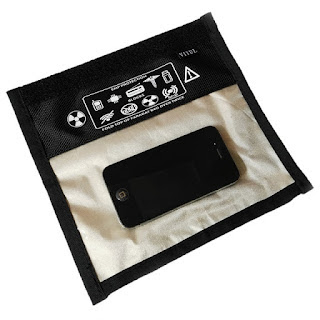
  • Forensic equipment , Faraday bag
    Faraday bag

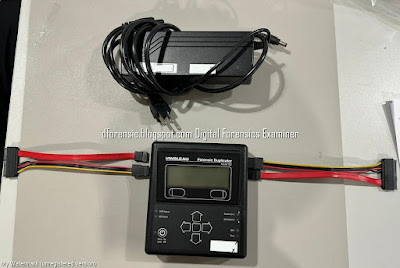
    TD2 + Write blocker

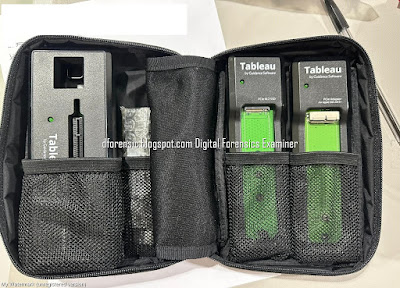
  • TD2 + Write blocker + Adapter m.2 ,nvme ,usb
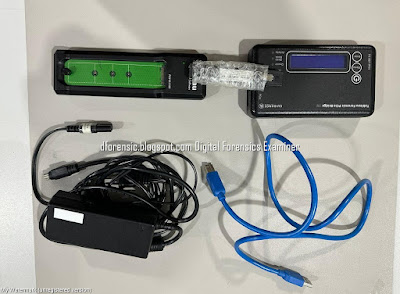
    TD2 + Write blocker
    TD2 + Write blocker


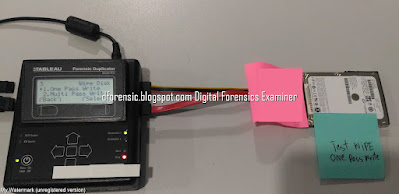
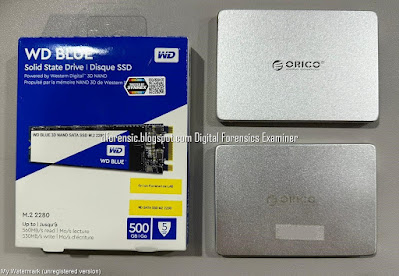
  •         Wipe a Hard Drive   for disk image 
    Digital Forensics Seized Forensic data collection


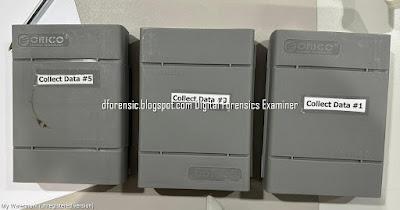
  •         Hard Drive Enclosure
    Hard Drive Enclosure

    Hard Drive Enclosure

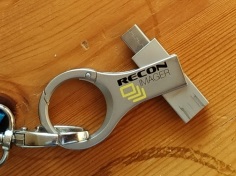
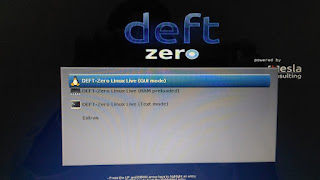
  • USB Boot Imager ,Deft ,Paladin + Caine-live , Windows To Go
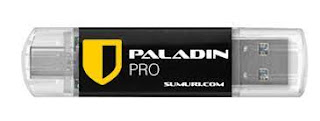
    USB Boot Imager
    USB Boot  recon imager

    Deft,GUYMAGER Acquisition Toot


  • Update forensics workstation software
    Digital Forensics Seized Forensic data collection

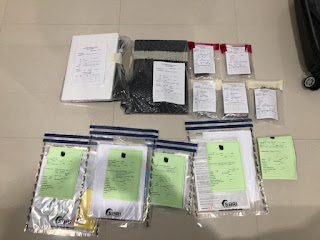
  • ปลั๊กไฟฟ้า+ถุงพลาสติก +label + ปากกา + กรรไกร ,Tamper-proof stickers ,Permanent markers
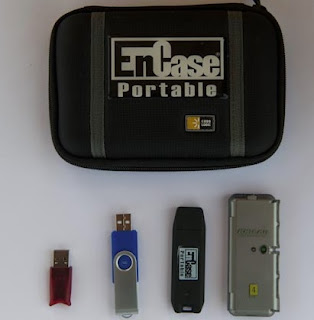
  •         USB dongle key
    Encase USB dongle key

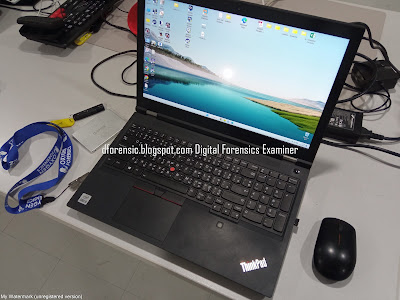
  • เครื่อง Notebook สำหรับ ทำ Forensic workstation
  • กล้องถ่ายรูป Camera, video recorder + ฺCamera Batteries

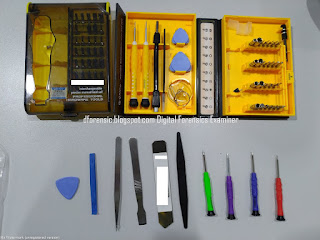
  •         ชุดไขขวง (Screwdrivers) &Toolkit
    Digital Forensics:Seized Forensic data collection

  • รายละเอียดของงาน (case requirements)  รุ่นคอมพิวเตอร์ + จำนวนเครื่องและขนาด HDD  ,เบอร์ติดต่อ Contact ,แผนที่ , วันเวลา
  • กรณี Onsite  Forensic Imager ประมาณเวลาที่ใช้ทำ Imager  ใน 1 วัน และเสร็จสิ้น   เช่น เริ่มงาน 9.00 เสร็จ 17.00  อยู่ได้ถึงกี่โมง สถานที่-ปิดกี่โมง  

Phase 2 Onsite

  • ลำดับหลักฐานที่สำคัญ    เครื่องคอมพิวเตอร์+โทรศัทพ์เคลื่อนที่ ทำก่อน
  • ถ่ายรูปหลักฐานอุปกรณ์  อะไรบ้าง + บันทึกวันเวลา
    • Serial number +Label name
    • Model +Label name
    • Notebook +Label name
    • อุปกรณ์ที่นำกลับ    เช่น Notebook + Adapter + mouse +Label name
    • State  On  or Off    + Time
  • Check Username  + Password   สอบถามเรื่อง Encryption and data protection & MDM

  • Document แต่ละเครื่อง + Document รวม + Chain of custody form
  •  หากไม่สามารถเก็บข้อมูลโทรศัพท์ได้ จำเป็นต้องใช้วิธีการ ถ่ายรูป (Chat Capture)
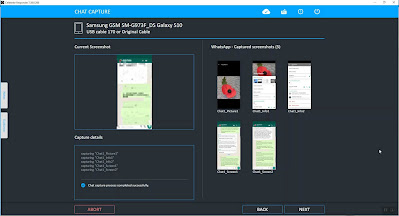
    Chat Capture

    อุปกรณ์   กล้องถ่ายรูป + ถุงมือ  , พลาสติกซีลของ +สำรอง ,กระดาษโน๊ต , Marker + กรรไกร
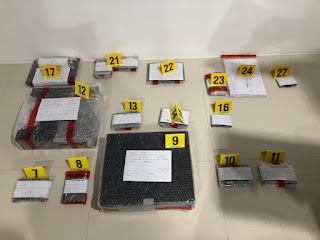
  • Digital Forensics:Seized Forensic data collection
  • โฟมใส่ โทรศัพท์ ป้องกันจอแตก
    Digital Forensics:Seized Forensic data collection

    Digital Forensics:Seized Forensic data collection
  • รถเข็น และลังใส่ของ หรือถุงหิ้ว ,ถุงพลาสติกใส่หลักฐาน
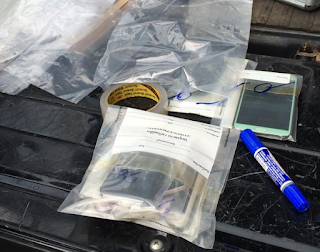
    Digital Forensics:Seized Forensic data collection
    Digital Forensics:Seized Forensic data collection
  • ตรวจสอบรอยแตก หรือรอยขีดข่วน ของหลักฐาน และบันทึก ก่อน seize 

  • ตรวจสอบ เอกสาร  เอกสารใบรับ-ส่ง ของ (Log),Exhibit Reference ,Property Receipt ,Mobile Phone Consent Form ลายเซ็นใบรับของ  ความครบถ้วน
    Digital Forensics:Seized Forensic data collection

  • สรุปจำนวนหลักฐานที่ทำการตรวจยึดทั้งหมด และจัดทำรายงาน

Phase 3  On lab ,Analyze 

  • เตรียม Storage  เก็บ Image  หรือ HDD  ที่เราเก็บไว้สำหรับวิเคราะห์  ต้องซื้อเพิ่มหรือไม่
  • ใช้เวลา Acquisition  กี่วัน Forensic Image  + Time  ที่ใช้
  • ใช้เวลา Analyze   กี่วัน
  • ลำดับหลักฐานที่สำคัญ    เครื่องคอมพิวเตอร์+โทรศัทพ์ที่สำคัญ 
  • ต้องส่งเครื่องคอมพิวเตอร์+โทรศัทพ์คืนภายในกี่วัน 
  • ใช้วิธีการใดในการทำ Acquisition เช่น  TD2 ,USB Boot Deft ,Paladin ,FTK Imager with write blocker
  • เตรียม คำถามในที่ประชุม ?
  • ตรวจสอบรอยแตก หรือรอยขีดข่วน ของหลักฐาน และบันทึก (ในแบบฟอร์ม)
  • ใบส่งของ & ติดตามและUpdate สถานะ

CHECKLIST OF BASIC DFL EQUIPMENT
The following is a suggested list of basic equipment that a DFL should own. The reader should
note that the list is non-exhaustive and more may be required depending on the nature of cases
received.

1 Laptop    = 3  
2 Computer analysis software  = 3  
3 Data recovery software = 2
4 Mobile device analysis software = 1
5 Internet artefacts analysis software = 3
6 Virtual machine software = 2
virtualbox and  VMWare 
7 Imaging Hardware = 2
8 Write blocker = 1
9 Empty storage media – to store data extracted from electronic evidence in the short and long term:
  Pen drive  = ?
  External hard disk  = ?
  Hard disk  = ?
  Server = ?
10 Power cable extension =OK
11 Camera, video recorder =OK
12 Printer = OK
13 Document shredder = Not
14 Storage box or container for carrying equipment = ok
15 Tools
    glove
    Permanent markers
    Screwdrivers
    Magnifying glass = Not
    Evidence sealing or evidence bags
    Tamper-proof stickers
16 Monitor the lab environment regularly – temperature, humidity,cleanliness.= 
17 Network Switch = Not
18 Power Backup System (UPS) =? 
หมายเหตุ :  เป็นขั้นตอนการทำงาน และข้อควรระวัง

#WINDOWSFORENSIC #COMPUTERFORENSICS #DFIR #FORENSICS #DIGITALFORENSICS #COMPUTERFORENSIC #INVESTIGATION #CYBERCRIME #FRAUD 


หมายเหตุ:เนื้อหาในเว็บไซต์นี้มีขึ้นเพื่อวัตถุประสงค์ในการให้ข้อมูลและเพื่อการศึกษาเท่านั้น
* หากมีข้อมูลข้อผิดพลาดประการใด ขออภัยมา ณ ที่นี้ด้วย  รบกวนแจ้ง Admin เพื่อแก้ไขต่อไป
ขอบคุณครับ

Saturday, June 6, 2020

DIGITAL FORENSICS:เครื่องมือตรวจพิสูจน์พยานหลักฐานดิจิทัล

DIGITAL FORENSICS:เครื่องมือตรวจพิสูจน์พยานหลักฐานดิจิทัล

DIGITAL FORENSICS:เครื่องมือตรวจพิสูจน์พยานหลักฐานดิจิทัล

เครื่องมือตรวจพิสูจน์พยานหลักฐานดิจิทัล

เครื่องมือคำอธิบาย
Database forensicsการพิสูจน์พยานหลักฐานในเรื่องฐานข้อมูล
Email analysisการวิเคราะห์จดหมายอิเล็กทรอนิกส์หรืออีเมล
Audio/video forensics การพิสูจน์พยานหลักฐานในเรื่องของสื่อที่เป็นไฟล์เสียงหรือ ภาพเคลื่อนไหว่
Internet browsing analysisการพิสูจน์พยานหลักฐานในเรื่องการเข้าถึงอินเทอร์เน็ต
Network forensicsการพิสูจน์พยานหลักฐานที่เกี่ยวข้องกับระบบเครือข่าย
Memory forensicsการพิสูจน์พยานหลักฐานข้อมูลในหน่วยความจำหลัก
File analysisการพิสูจน์พยานหลักฐานที่เกี่ยวกับไฟล์ต่างๆ
Disk and data captureการพิสูจน์พยานหลักฐานในสื่อบันทึกข้อมูลต่างๆ และการ จับข้อมูลทางดิจิทัล
Computer forensicsการพิสูจน์พยานหลักฐานของเครื่องคอมพิวเตอร์
Digital image forensicsการพิสูจน์พยานหลักฐานที่เป็นข้อมูลรูปภาพ


5 แนวทาง ในการเลือกเครื่องมือตรวจพิสูจน์พยานหลักฐานด้านดิจิทัลให้เหมาะสม

การเลือกเครื่องมือที่ถูกต้อง ตรงความต้องการ ไม่ง่ายเสมอไป เพราะปัจจุบันมีเครื่องมือให้เลือกมากมาย ต่อไปนี้ เป็นแง่ มุมสำาหรับการพิจารณาตัดสินใจเลือก

DIGITAL FORENSICS:เครื่องมือตรวจพิสูจน์พยานหลักฐานดิจิทัล
Photo credit:Tistr.o.th

ที่มา: อ้างอิงจาก  (วิษณุ เรื่องวิทยานนท์ ,เครื่องมือตรวจพิสูจน์พยานหลักฐานดิจิทัล,วิทยาศาสตร์และเทศโนโลยี ปีที่  ฉบับ  มกราคม-มีนาคม 2563, หน้า 18-19.)


อ่านเพื่อเติม:

หมายเหตุ:เนื้อหาในเว็บไซต์นี้มีขึ้นเพื่อวัตถุประสงค์ในการให้ข้อมูลและเพื่อการศึกษาเท่านั้น

* หากมีข้อมูลข้อผิดพลาดประการใด ขออภัยมา ณ ที่นี้ด้วย  รบกวนแจ้ง Admin เพื่อแก้ไขต่อไป
ขอบคุณครับ

#WindowsForensic #ComputerForensics #dfir #forensics #digitalforensics #computerforensic #investigation #cybercrime #fraud

DIGITAL FORENSICS:WINDOWS FORENSIC .LNK FILES-PART 2

DIGITAL FORENSICS:Windows Forensic .LNK files-Part 2


วันนี้เราลองมาทดลองทำ Lab  WINDOWS FORENSIC  LNK File โดยใช้ LECmd
Where LNK extension link files are stored varies depending on the operating system. These files :
Windows XP :
  • \Documents and Settings\UserName\Recent
Windows Vista and Windows 7 :
  • \Users\UserName\AppData\Roaming\Microsoft\Windows\Recent Items

LNK file signature 
Hex Signature 4C 00 00 00 01 14 02 00
ASCII  8 Bytes
File Extension LNK
Magic value     ‘L’  ,       L.......


เครื่องมือที่ใช้สำหรับทำ Lab 


 Download LECmd
ตัวอย่างคำสั่งที่ใช้

Examples:
วิเคราะห์ LNK file
          LECmd.exe -f "C:\Temp\foobar.lnk"
          LECmd.exe -f "C:\Temp\somelink.lnk" --json "D:\jsonOutput" --jsonpretty
         
Export CSV
          LECmd.exe -d "C:\Temp" --csv "c:\temp" --html c:\temp --xml c:\temp\xml -q
          LECmd.exe -d "C:\Temp" --all

1. ทดสอบเปิด Folder & File ใน External drive

The original path of the file
F:\18 Computer Forensics\CTF\dfchallenge.org\201 - Let_s dig new memories

F:\18 Computer Forensics\CTF
2. เปิด ตำแหน่งของ LNK File  ที่อยู่บนเครื่อง computer
"Users\UserName\AppData\Roaming\Microsoft\Windows\Recent Items"

\Users\UserName\AppData\Roaming\Microsoft\Windows\Recent Items
3. Run Commnad 

 .\LECmd.exe  -f "C:\Users\UserName\AppData\Roaming\Microsoft\Windows\Recent\201 - Let_s dig new memories.lnk"


- File size of the linked file = 25,314
- Working Directory: F:\18 Computer Forensics\CTF\dfchallenge.org\201 - Let_s dig new memories

Target ID information 


Link Information -- ระบุรายละเอียดตำแหน่งของไฟล์ต้นฉบับ
Volume name and serial number
Label:  2019_2T
Serial number: 0C5D7EA3
Local path: F:\18 Computer Forensics\CTF\dfchallenge.org\201 - Let_s dig new memories


เมื่อมีการ เปิดไฟล์ 201 - Let_s dig new memories.docx ครั้งที่ 1
Source File: C:\Users\UserName-\AppData\Roaming\Microsoft\Windows\Recent\201 - Let_s dig new memories.lnk

Create Date    2020-06-26
Modified Date 2020-06-26  เมื่อมีการเปิดไฟล์ ค่า Modified จะมีการบันทึกค่าล่าสุด


เมื่อมีการ เปิดไฟล์ 201 - Let_s dig new memories.docx ครั้งที่ 2

Source File: C:\Users\UserName-\AppData\Roaming\Microsoft\Windows\Recent\201 - Let_s dig new memories.lnk

Create Date    2020-06-26
Modified Date 2020-07-13  เมื่อมีการ เปิดไฟล์อีกครั้ง ค่า Modified จะมีการบันทึกค่าล่าสุด
Computer name
Mac Address


4. Run Command Export to CSV File.
\LECmd.exe -d "C:\Users\Training-4\AppData\Roaming\Microsoft\Windows\Recent" --csv "c:\temp1"


Episode 19: “Quick Win” files #3 - .LNK files-Part 1

Episode 20: “Quick Win” files #3 - .LNK files-Part 2


WINDOWS FORENSIC .LNK FILES-PART 1


What are LNK Files?

LNK files are a relatively simple but valuable artifact for the forensics investigator. They are shortcut files that link to an application or file commonly found on a user’s desktop, or throughout a system and end with an .LNK extension. LNK files can be created by the user, or automatically by the Windows operating system. Each has their own value and meaning. Windows-created LNK files are generated when a user opens a local or remote file or document, giving investigators valuable information on a suspect’s activity.

Why are LNK Files Important to Your Digital Forensics Investigation?

LNK files are excellent artifacts for forensic investigators who are trying to find files that may no longer exist on the system they’re examining. The files might have been wiped or deleted, stored on a USB or network share, so although the file might no longer be there, the LNK files associated with the original file will still exist (and reveal valuable information as to what was executed on the system).
Credit :www.magnetforensics

Windows Shortcut File (LNK)

สรุป
       .LNK จะถูกสร้างขึ้นโดยอัตโนมัติเมื่อ User มีการเปิดไฟล์ (Open File) จะมีนามสกุล .LNK
       .LNK จะถูกสร้างขึ้นเมื่อ User สร้าง shortcut ของโปรแกรมหรือไฟล์ และจะมีนามสกุล LNK
       เมื่อมีการเปิดไฟล์ LNK File จะมีการ Update  ค่าวันเวลา Create ,Modify ,Access
       เมื่อมีการลบ File หรือ Folder ต้นฉบับ แต่ไฟล์ .LNK จะไม่ถูกลบไปด้วย
     
ที่มา:
https://medium.com/ctf-writeups/hack-the-box-access-write-up-33ab4cb7d9b3
https://medium.com/@snowshoe/ctf-secplayground-2018-write-up-a18e711341a1
https://nandynarwhals.org/codegate2012-forensics100/
https://or10nlabs.tech/defcon-dfir-ctf-2018/#file-server-basic
https://ericzimmerman.github.io/#!index.md
https://blog.nviso.eu/2017/04/04/tracking-threat-actors-through-lnk-files/
https://www.magnetforensics.com/blog/forensic-analysis-of-lnk-files

หมายเหตุ:เนื้อหาในเว็บไซต์นี้มีขึ้นเพื่อวัตถุประสงค์ในการให้ข้อมูลและเพื่อการศึกษาเท่านั้น

* หากมีข้อมูลข้อผิดพลาดประการใด ขออภัยมา ณ ที่นี้ด้วย  รบกวนแจ้ง Admin เพื่อแก้ไขต่อไป
ขอบคุณครับ

#WindowsForensic #ComputerForensics #dfir #forensics #digitalforensics #computerforensic #investigation #cybercrime #fraud


Friday, June 5, 2020

NIST Scientific Foundation Study for Digital Examiners

DIGITAL FORENSICS:NIST Scientific Foundation Study for Digital Examiners


NIST to Digital Forensics Experts: Show Us What You Got

First large-scale “black box” study will test the accuracy of computer and mobile phone forensics.

 “We want to understand the state of the practice. Can experts produce accurate and reliable information when extracting data from a digital device?” —Barbara Guttman, leader of NIST’s digital forensics research program
For the NIST black box study, participants will download simulated evidence from the NIST website in the form of one virtual mobile phone and one virtual computer. Such virtual devices, called “forensic images,” are commonly used in digital forensics, and study participants will be able to connect to them using the same software tools they use when working on real cases.
The forensic images created for this study simulate imagined but realistic scenarios involving a potential homicide and a potential theft of intellectual property. Study participants will download the images, examine them using whatever forensic software tools they choose, and answer a series of questions. For instance:
  • What software program was used to discuss a potentially illegal transaction? 
  • What was the VIN number of the vehicle that connected to the phone via Bluetooth?  
  • What location information can be gleaned from the photo of a black Labrador found on this device?

Welcome to NIST Scientific Foundation Study for Digital Examiners

You have chosen to take the offline simulated case study for the hard drive test.

Your will need to download the material for the offline simulated case study.
These files include the image file download for the hard drive test study, as well as the testing worksheet.
We estimate the test to take approximately 2 hours to complete after downloading the simulated case material.
Complete the case study offline then return your worksheet answers to NIST using the 'Test Survey' link listed below.

Testing Image Download:
Size mobile image, 5.2GB hard drive image 19GB


Image Download File Signatures:
mobile image SHAs =
MD5=c54a9c1659d931b14154c919929005b9 UFED_Samsung_GSM_SM-G920A_Galaxy_S6_2019_08_13_(001).zip
SHA1=43a7a27638020e2593d540186edc0e5f398a608b UFED_Samsung_GSM_SM-G920A_Galaxy_S6_2019_08_13_(001).zip
SHA256=04b2db3258ef30ebb1a3be47b9716455ef4fb1ede677a933470291eca82e9aff UFED_Samsung_GSM_SM-G920A_Galaxy_S6_2019_08_13_(001).zip

hard drive image SHAs
MD5=c1128ffc1c0582234d3a6fbb3a762d11 HardDrive-002.zip
SHA1= 795c2fd3632e5dc76cb4acfc9e42a948f73599a0 HardDrive-002.zip
SHA256= 8501aa9ba74fd4410489c8b2e1b120aa27c1bb8bac4c740f73ba708fff836445 HardDrive-002.zip

Testing Worksheet:


Testing Worksheet File Signatures:
mobile worksheet SHAs
nist_mobile_test_questions.pdf MD5=f821fb48dc5b6a7c8f63cd170bc514fd
nist_mobile_test_questions.pdf SHA1=c908963e6460205decd49be46696fd6f96573d6b
nist_mobile_test_questions.pdf SHA256=c8f5188538fc3187b374a332bb5de21817d3a1cea2f5e440ac9abf1faf5ece3a

hard drive worksheet SHAs
NIST_HD_TestQuestions.pdf MD5=a877e2d29e5e237592468d71c0c93158
NIST_HD_TestQuestions.pdf SHA1=377cd970c6828fa29b96fd0bf42a8019372ad3ab
NIST_HD_TestQuestions.pdf SHA256=662578cb175988cada78f00b6e5b7d53e157d23e362d9bd37fd75352291b4969


Expiration Date: 07/31/2022

NIST Blackbox Study for Digital Examiners


หมายเหตุ:เนื้อหาในเว็บไซต์นี้มีขึ้นเพื่อวัตถุประสงค์ในการให้ข้อมูลและเพื่อการศึกษาเท่านั้น

* หากมีข้อมูลข้อผิดพลาดประการใด ขออภัยมา ณ ที่นี้ด้วย  รบกวนแจ้ง Admin เพื่อแก้ไขต่อไป
ขอบคุณครับ

NIST black box study

#WindowsForensic #ComputerForensics #dfir #forensics #digitalforensics #computerforensic #investigation #cybercrime #fraud #ฝึกทำLab

Volatility Lab

Volatility Lab  Image Wanna.vmem P.73 windows.info #python3  vol.py   -f '/home/kali/Desktop/Wanna/Wanna-MEM.vmem' windows.info     ...