Digital Forensics: Challenge #2 - User Policy Violation Case
Challenge #2 - User Policy Violation Case
This is another digital forensics image that was prepared to cover a full Windows Forensics course.

- You can use the image to learn the following:
- File Carving, Custom Carving, and Keyword Searching
- File System Forensics - NTFS
- Deep Windows Registry Forensics: System and User Hives
- SYSTEM
- SOFTWARE
- SAM
- NTUSER.DAT
- USRCLASS.DAT
- Other Windows Files: LNK, Jump Lists, Libraries, etc

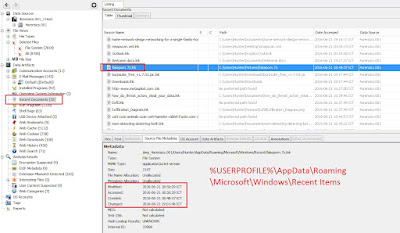
- UserAssist Applications launched via Explorer "HKCU\Software\Microsoft\Windows\CurrentVersion\Explorer\UserAssist"

- RegistryExplorer shows it has decrypted the ROT13 encryption

- Application Compatibility Cache (ShimCache)
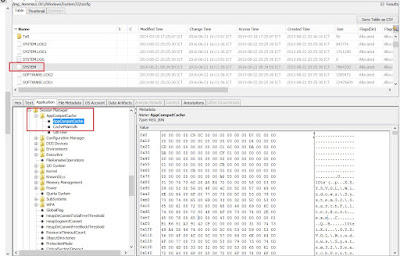
- Analyzing Windows Search (Search Charm)
- Analyzing Thumb Caches
- Analyzing Prefetch Files
 Winprefetchview , NirSoft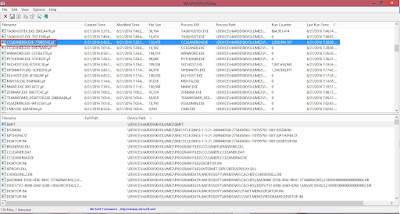
- Analyzing Recycle Bin(s)

- USB Forensics
- Events Analysis
- Email Forensics: Web and Outlook
- Browser Forensics: Internet Explorer and Google Chrome
- Skype Forensics


- It was being operated remotely 2016/06/21 12:14:29.

$I5Z6K8U : The highlighted ASCII text: C:\Users\Hunter\Pictures\fakeporn

: The highlighted ASCII text: C:\Users\Hunter\Pictures.7z

This image covers most if not all of the recent system artifacts that you might encounter. Let me know if you need any help or if you are an instructor and want the answers to each part of the case. I will only send the answers to verified instructors.
End of Case.


Refer:Ali Hadi
หมายเหตุ:เนื้อหาในเว็บไซต์นี้มีขึ้นเพื่อวัตถุประสงค์ในการให้ข้อมูลและเพื่อการศึกษาเท่านั้น
* หากมีข้อมูลข้อผิดพลาดประการใด ขออภัยมา ณ ที่นี้ด้วย รบกวนแจ้ง Admin เพื่อแก้ไขต่อไป
ขอบคุณครับ


No comments:
Post a Comment